
Wi-Fi 6 vs. Wi-Fi 7 in plain English: real speeds, latency, range, 6 GHz rules in Canada, and whether you should upgrade now or wait.
Wi-Fi 7 is the faster, more responsive standard, but it only pays off when your devices, your router and your internet plan can all use it. If your phones and laptops are Wi-Fi 6 and your plan tops out at a few hundred megabits, Wi-Fi 6 is still a very good network. If you have a gigabit-plus plan, a household full of new devices, or you game, video-call and move big files at the same time, Wi-Fi 7 is a smart move. Here is how to tell which camp you are in, with the numbers, the catches and the Canadian details.
TL;DR
- Wi-Fi 7 (802.11be) raises the theoretical ceiling to 46 Gbps from Wi-Fi 6’s 9.6 Gbps, but real homes see a fraction of that, and only on devices that support it.
- The biggest everyday gain is not raw speed. It is lower, steadier latency from Multi-Link Operation (MLO), which helps calls, gaming and crowded households.
- Wi-Fi 7 does not reach through walls better. Its fastest band, 6 GHz, fades faster than 5 GHz or 2.4 GHz, so layout matters as much as the standard.
- Check that a “Wi-Fi 7” router is tri-band with 6 GHz, and buy hardware certified for Canada.
- Upgrade now if you have a multi-gig plan or many Wi-Fi 7 devices. Otherwise a good Wi-Fi 6 or 6E router can wait.
Table of Contents
- Wi-Fi 6 vs. Wi-Fi 7 at a glance
- What Wi-Fi 7 actually changes
- Speed in the real world
- Wi-Fi 6E vs. Wi-Fi 7: the closer comparison
- Does Wi-Fi 7 go through walls better?
- Wi-Fi 7 mesh systems: what to know
- Not every “Wi-Fi 7” router is the same
- Canada’s 6 GHz rules, in plain language
- Should you upgrade to Wi-Fi 7?
- Our perspective
- Work with us
- Frequently asked questions
- Sources
Wi-Fi 6 vs. Wi-Fi 7 at a glance
Wi-Fi 6 is the marketing name for IEEE 802.11ax. Wi-Fi 7 is 802.11be. Wi-Fi 6E is simply Wi-Fi 6 with access to the 6 GHz band, which makes it the stepping stone between the two. Here is how the three line up on the points that matter at home.
| Feature | Wi-Fi 6 | Wi-Fi 6E | Wi-Fi 7 |
|---|---|---|---|
| Standard | 802.11ax | 802.11ax | 802.11be |
| Bands | 2.4 and 5 GHz | 2.4, 5 and 6 GHz | 2.4, 5 and 6 GHz |
| Widest channel | 160 MHz | 160 MHz | 320 MHz |
| Max theoretical speed | 9.6 Gbps | 9.6 Gbps | 46 Gbps |
| Modulation | 1024-QAM | 1024-QAM | 4096-QAM |
| Multi-Link Operation | No | No | Yes |
The channel width, speed ceiling and band figures come from a networking vendor’s side-by-side comparison. The key point from ASUS’s support documentation is that plain Wi-Fi 6 stops at 2.4 and 5 GHz, while 6 GHz is supported only by Wi-Fi 6E and Wi-Fi 7.
Treat the 46 Gbps figure as a lab number. It assumes the widest channels, the best modulation and the maximum number of antennas on both ends. Your phone has two antennas and your router sits behind a couple of walls.
What Wi-Fi 7 actually changes
Three upgrades do most of the work. The rest is refinement.
Wider 320 MHz channels
Think of a channel as a pipe. Wi-Fi 6 and 6E top out at 160 MHz. Wi-Fi 7 doubles that to 320 MHz, but only in the 6 GHz band, where there is enough empty spectrum to fit it. A wider pipe moves more data at once, which is why a fast phone or laptop can get close to multi-gigabit speeds when it sits in the same room as the router.
In a dense apartment building, a 320 MHz channel can also be harder to keep clean. Wi-Fi 7 includes preamble puncturing, which lets a router carve out a patch of interference rather than abandoning the whole channel. It is a quiet feature, but it helps in crowded condos.
4096-QAM modulation
QAM is how much information is packed into each radio signal. Wi-Fi 6 uses 1024-QAM. Wi-Fi 7 uses 4096-QAM, which carries about 20 percent more data per signal. The catch is that it needs a strong, clean connection, so you get the benefit mostly at short range.
Multi-Link Operation (MLO)
This is the feature we would single out. With Wi-Fi 6, your phone picks one band at a time, say 5 GHz, and sticks with it until something goes wrong. With MLO, a compatible device can send and receive across several bands at once, and shift traffic to whichever is clearest at that moment. That means fewer stalls when someone microwaves lunch, fewer freezes on a video call, and steadier performance when the house gets busy.
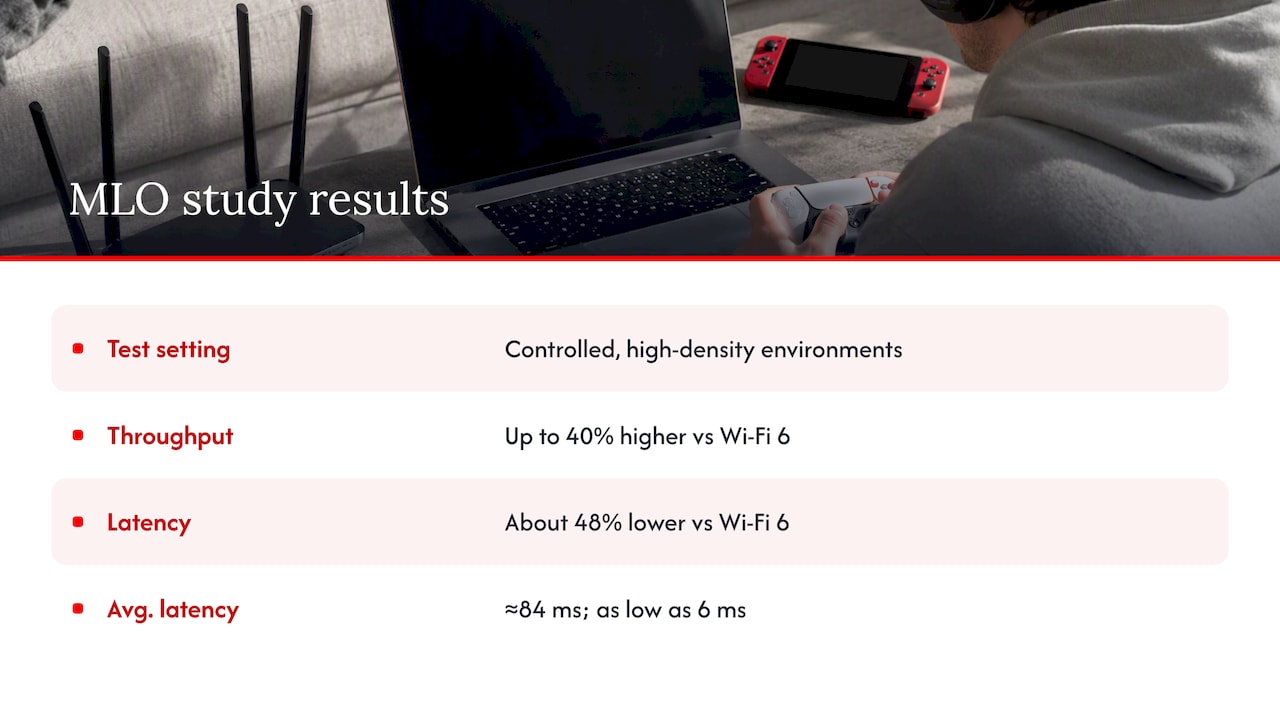
The research backs the direction. A peer-reviewed study of Wi-Fi 7 in high-density environments reports up to 40 percent higher throughput and about 48 percent lower latency than Wi-Fi 6, with average latency falling from around 84 ms to as low as 6 ms in the best test conditions. Those are controlled test setups with many devices competing for airtime, not a typical Canadian living room, so expect a smaller but still noticeable improvement at home.
Speed in the real world
Headline numbers rarely survive contact with a house. A few things decide what you will actually see.
- Your internet plan. If your plan is 500 Mbps, a router capable of several gigabits cannot make it faster. Wi-Fi 7 only becomes the bottleneck-breaker when your plan is well past what Wi-Fi 6 can deliver at your location.
- Your devices. This is the most common mistake we see. Buying a Wi-Fi 7 router does not speed up a Wi-Fi 6 laptop. As network technology experts point out, client devices that only support Wi-Fi 6 cannot use features like MLO or 320 MHz channels, so you do not get the full upgrade until the devices change too.
- Distance and walls. More on this below.
- Wired backhaul. If you use a mesh system, how the nodes talk to each other matters more than the label on the box.
In practice, a Wi-Fi 6 phone on a Wi-Fi 7 router still gets the benefits of a newer, more capable access point: better handling of many connections, more processing power and often a better 5 GHz radio. It just does not unlock the new tricks.
A worked example
Picture a four-person household in a two-storey home in Mississauga. There is a 1.5 Gbps fibre plan, two laptops, two phones, a streaming box, a console and about 20 smart-home gadgets. The laptops are three years old (Wi-Fi 6), the phones are a mix. In that house, a Wi-Fi 7 router gives modest gains today, because only the newest phone can use MLO. As the family replaces devices over the next two or three years, the gains grow. Buying now means the router is ready when the devices catch up.
Now take a one-bedroom condo with a 300 Mbps plan and a Wi-Fi 6 router in decent shape. There is almost nothing to gain from upgrading. The money is better spent elsewhere, such as moving the router to a central spot. Our guide to why your Wi-Fi is so slow walks through the free fixes first.
Wi-Fi 6E vs. Wi-Fi 7: the closer comparison
This is where many shoppers are stuck, because 6E routers are often discounted. Both use the 6 GHz band, so both get the benefit of its uncrowded airspace. What Wi-Fi 7 adds is the wider 320 MHz channel, 4096-QAM and MLO. A comparison of the two standards describes Wi-Fi 7 as a supercharged version of Wi-Fi 6E, and that is a fair summary.
Here is how we would choose:
- Pick Wi-Fi 6E if you have a plan under about 1 Gbps, you mostly use phones and laptops that are Wi-Fi 6E at best, and a good price matters more than future-proofing.
- Pick Wi-Fi 7 if you are buying a router you want to keep for five or more years, you have or plan to buy new flagship phones and laptops, or you have a multi-gig plan.
- Stay with Wi-Fi 6 if your current router is under five years old, covers your home well and nothing feels slow.
Does Wi-Fi 7 go through walls better?
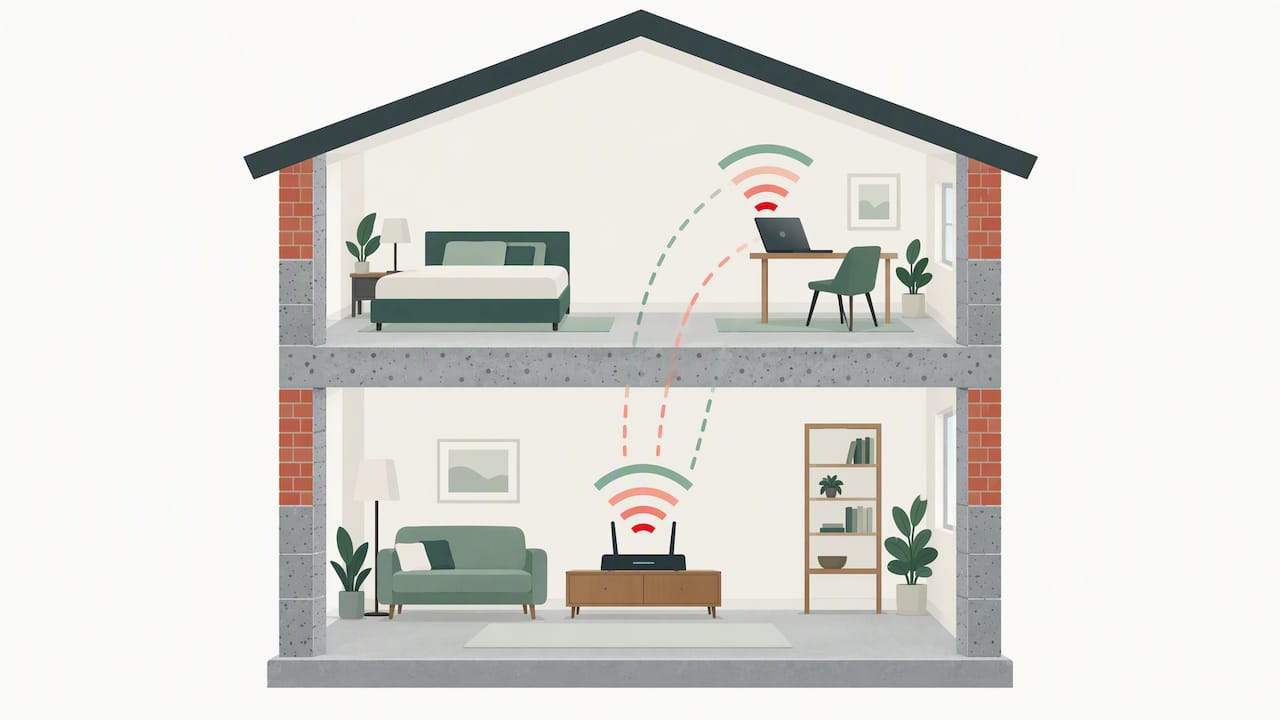
No, and this surprises a lot of people. Wi-Fi 7 is a set of radio techniques, not a stronger signal. Its top speeds live in the 6 GHz band, and higher frequencies lose more energy to building materials. RF engineering data puts the loss through a concrete block at roughly 15 to 25 dB at 6 GHz versus 10 to 20 dB at 5 GHz, and the 6 GHz coverage radius at around 60 to 70 percent of 2.4 GHz.
That has real consequences in Canadian homes. Basements with poured concrete, brick-and-plaster semi-detached houses, and condos with concrete floors all punish 6 GHz. A Wi-Fi 7 device in the next room may enjoy blazing speeds, while the same device two floors up drops back to 5 GHz or 2.4 GHz and performs much like Wi-Fi 6.
If upstairs coverage is your problem, a new standard is rarely the first answer. Start with placement and see our walkthrough on improving Wi-Fi signal upstairs. For larger or awkward homes, a professional assessment can save you from buying the wrong hardware. This overview of Wi-Fi site surveys for Canadian businesses explains how surveys map signal strength and dead zones, and the same logic applies to a big home or a home office.
Wi-Fi 7 mesh systems: what to know
Mesh is where Wi-Fi 7 can matter most, and where labels mislead most. A mesh system uses a main router plus satellite nodes. In older tri-band mesh kits, one band is often reserved to link the nodes together. Wi-Fi 7 mesh kits with a dedicated 6 GHz or wired link can keep that connection fast, which helps the far corners of the house.
Before you buy a Wi-Fi 7 mesh kit, check these points:
- Wired backhaul. If you can run Ethernet to each node, do it. It beats any wireless link and frees every band for your devices.
- Ethernet ports. A multi-gig port (2.5 Gbps or faster) on the main node is worth having if your plan is above 1 Gbps. A gigabit port would cap you.
- Number of nodes. More nodes are not always better. In a typical 2,000 square foot home, two well-placed nodes often beat three poorly placed ones.
- App and settings. Some systems hide MLO or 320 MHz behind advanced menus, or turn them off by default.
Not every “Wi-Fi 7” router is the same
This is the buying trap. The standard allows for several configurations, and some lower-cost products leave out the best parts. The Canadian 6GHz.ca resource notes that some cheaper or IoT-focused Wi-Fi 7 hardware is dual-band only, with no 6 GHz at all. Such a device carries the Wi-Fi 7 badge but cannot use the 320 MHz channels or enjoy the lowest latency.
Prices show how wide the range is. A quick look at Newegg.ca router listings shows a dual-band BE3600 model at $169.99, while tri-band and gaming-focused models run well into the hundreds and, for some, past $1,000. Prices change often, so check the current listing before you buy. Do not assume the cheapest Wi-Fi 7 router gives you the full feature set.
When you compare models, look for:
- Tri-band with 6 GHz listed explicitly on the spec sheet.
- 320 MHz channel support, not just 160 MHz.
- MLO support, noted in the specs or firmware notes.
- A 2.5 Gbps or faster WAN port if your plan is above 1 Gbps.
- Canadian certification, covered next.
Canada’s 6 GHz rules, in plain language
The 6 GHz band is regulated here, and it helps to know the basics. According to 6GHz.ca, low-power indoor (LPI) and very-low-power devices, which cover most consumer Wi-Fi 6E and Wi-Fi 7 hardware, have been available since late 2021 and operate without Automated Frequency Coordination (AFC). Higher-power, outdoor-capable operation is different. It needs a designated AFC system, and ISED’s rules for AFC standard-power operation were harmonized with the FCC’s approach, with operators authorized from 2024. Vendors have followed: Cisco announced general availability of its AFC feature in Canada on July 29, 2025. For a deeper look at how the system works, see this overview of Automated Frequency Coordination.
What this means for you:
- A normal home router uses indoor low-power mode. You do not configure AFC yourself.
- Buy hardware sold for the Canadian market and certified by ISED. Importing a US-only model is not a safe shortcut, since the regulatory details are not identical.
- Outdoor Wi-Fi 7 setups, such as a backyard studio or a farm outbuilding, may involve standard-power rules. Ask the seller how the product handles them.
Should you upgrade to Wi-Fi 7?
Use this short checklist. The more boxes you tick, the stronger the case.
- You pay for an internet plan above 1 Gbps, or you plan to.
- You own, or will soon buy, at least two Wi-Fi 7 devices, such as a recent flagship phone or laptop.
- Your household runs many devices at once, and video calls or games stutter at busy times.
- You transfer large files across your home network, for example to a NAS or editing workstation.
- Your current router is five or more years old.
- You want to buy once and keep the router through the next several device cycles.
If you tick one or two, a Wi-Fi 6E router is a sensible middle path. If you tick none, keep what you have and improve placement first.
Gamers and remote workers
Latency is the reason to care. If you play online games, MLO’s steadier connection can reduce the spikes that cause rubber-banding. Wired Ethernet still wins for a console or gaming PC, though, and we cover other ways to cut lag in our piece on reducing ping on any device. For remote work, the gains are in call stability when the network is busy, not in faster email.
Smart homes and streaming
Smart-home gadgets are mostly low-bandwidth and many still rely on 2.4 GHz, so they gain little from Wi-Fi 7 itself. What helps is a router that handles dozens of connections without slowing down. If you are weighing hubs, see how to compare smart home hubs. For 4K and 8K streaming, your bottleneck is more likely your plan than your Wi-Fi, and our guide to comparing streaming devices helps you choose a box that matches your network.
Our perspective
We see the same pattern with every new Wi-Fi generation. The standard arrives, the marketing promises multiples of speed, and shoppers rush to replace routers that were working fine. Our team at Lizard’s Lunch reads the spec sheets and the research so you do not have to, and our honest take is this: Wi-Fi 7 is a genuine step forward, and MLO is the part worth caring about, but it is a step you take on your own timeline.
If you are buying a router today, Wi-Fi 7 is a reasonable default, as long as you verify the 6 GHz band and the Canadian certification. If you already have a decent Wi-Fi 6 or 6E router, the best upgrade for most homes is still placement, wired backhaul and a plan that matches how you use the internet. We would rather you spend an afternoon moving a router and running one cable than spend hundreds of dollars and see no difference.
— Our team at Lizard’s Lunch
Work with us
If you run a tech, networking or home-improvement brand and want to reach readers who are researching purchases like this one, our team publishes banner placements and guest posts. You can find the details on our advertising page.
Frequently asked questions
Is Wi-Fi 7 worth it over Wi-Fi 6?
It is worth it when you have a plan above 1 Gbps, several Wi-Fi 7 devices or a crowded network. For a modest plan and older devices, the difference will be small. The steadier latency from MLO is the most noticeable benefit for most households.
Will Wi-Fi 7 work with my old devices?
Yes. Wi-Fi 7 routers are backward compatible, so Wi-Fi 5 and Wi-Fi 6 devices connect normally. They just will not use 320 MHz channels or MLO, so they will not run faster than before.
What are the downsides of Wi-Fi 7?
The main ones are cost, uneven device support and shorter reach on the 6 GHz band. Some cheaper models also leave out 6 GHz altogether. Check the spec sheet before you buy.
Is Wi-Fi 6 still good this year?
Yes. A well-placed Wi-Fi 6 router handles streaming, video calls and work from home for most Canadian households. Replace it when it struggles with your plan speed or the number of devices, not because a newer label exists.
Should I choose Wi-Fi 6E or Wi-Fi 7?
Choose Wi-Fi 6E if price matters most and your devices are older. Choose Wi-Fi 7 if you want a router that will keep up for five years or more. Both use the 6 GHz band, so both beat standard Wi-Fi 6 for congestion.
Sources
- Performance Evaluation and Latency Optimization of Wi-Fi 7 in High-Density Wireless Environments
- How the 6 GHz Band Used by Wi-Fi 6E Differs from 2.4 and 5 GHz in Propagation, RF Essentials
- Wi-Fi 7 Access Point vs. Wi-Fi 6 Access Point, Aletheatech
- 6GHz.ca
- AFC Standard Power 6 GHz in Canada
- Automated Frequency Coordination for Canada, Cisco Community
- Automated Frequency Coordination, Wikipedia
- What’s the difference between 2.4GHz, 5GHz, and 6GHz, ASUS Support
- Wi-Fi 6 vs. Wi-Fi 7: What’s the Difference?, Omada Networks
- Wi-Fi 6E vs. Wi-Fi 7: What Are the Actual Differences?
- Wi-Fi 7 router listings, Newegg.ca
















Leave a Comment
Your email address will not be published. Required fields are marked with *