Discover the role of tech in home security today. Learn how smart systems enhance safety, deter intruders, and empower smarter protection.
Over 40% of residential burglaries involve no forced entry at all. That single fact changes how you should think about home protection. The role of tech in home security goes far beyond alarm boxes and cameras. Today’s smart home security systems coordinate sensors, locks, lights, and monitoring platforms into one responsive, always-on layer of defense. Whether you rent an apartment or own a house, understanding how technology in home safety works, and where it can actually fail you, helps you spend smarter and sleep better.
Table of Contents
- Key takeaways
- The role of tech in home security systems
- Cybersecurity risks in smart security devices
- What the data says about tech and break-in prevention
- Choosing, installing, and maintaining your system
- My take on where most people get it wrong
- Take your home upgrades further
- FAQ
Key takeaways
| Point | Details |
|---|---|
| Tech closes real entry gaps | Smart locks and sensors address the 40%+ of break-ins that exploit unlocked doors and windows. |
| Cybersecurity risks are real | Cloud-connected devices carry firmware and credential vulnerabilities that need active management. |
| Visible deterrents work | Cameras, lights, and alarm signage make 60% of burglars avoid a home entirely. |
| Hub security is non-negotiable | Compromising your smart hub exposes every connected device, so protect it first. |
| Habits amplify tech | Technology works best when paired with consistent locking and testing routines. |
The role of tech in home security systems
Modern home security is not a single device. It is an ecosystem where every component talks to the others, and that coordination is exactly what makes it so much more effective than a standalone deadbolt or a basic alarm bell.
Smart locks, cameras, and sensors working together
Smart locks replace or supplement traditional deadbolts with Wi-Fi or Bluetooth connectivity, letting you lock and unlock remotely, set access codes for guests, and get instant alerts when a door opens. Pair that with a video doorbell, and you can see who is at your door from anywhere on the planet. Add window and door sensors, and you get a complete picture of every entry point in real time.
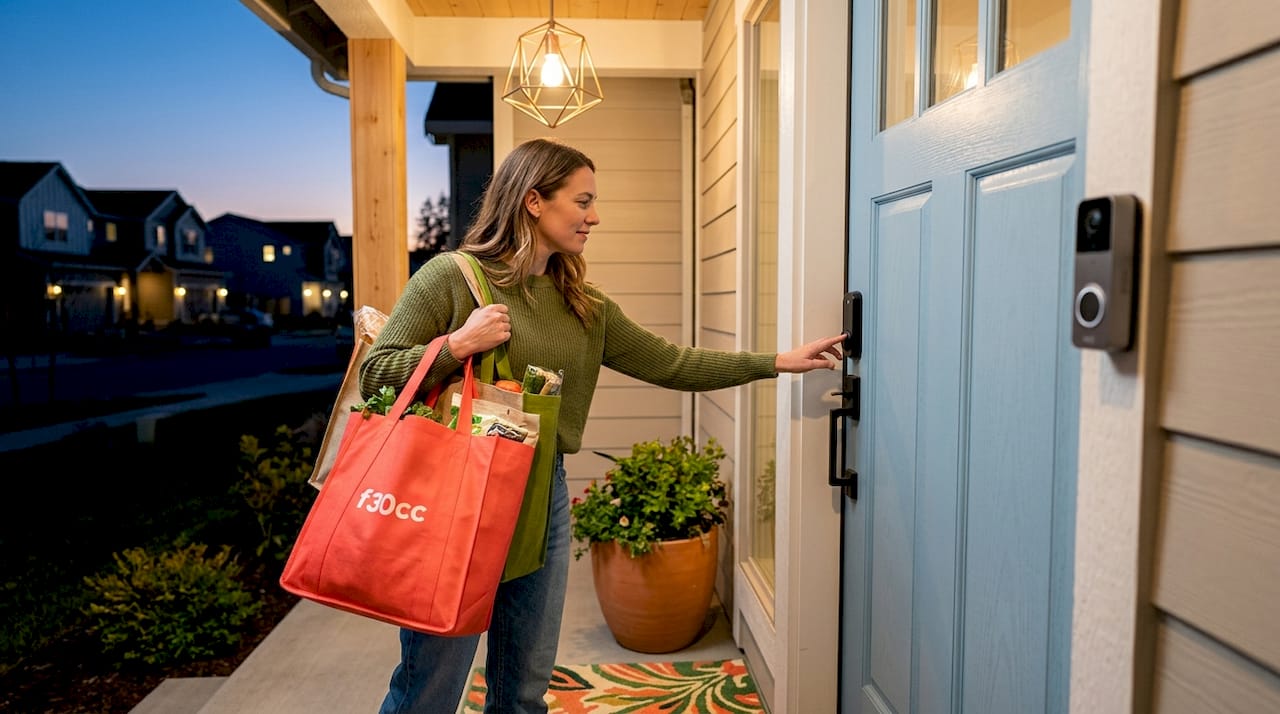
Motion-detecting cameras take things further. Many models now use AI-powered analysis to distinguish between a delivery person, a family member, and an unknown individual. Some systems automatically activate exterior lights when motion is detected after dark, which is one of the most underrated deterrents available. Light alone discourages casual intrusion without requiring any human response at all.
How smart hubs tie everything together
The smart hub is the central brain of your home security setup. It connects your locks, sensors, cameras, and alarms into a single coordinated system, allowing automated responses that no human could manage manually. When a door sensor triggers at 2 a.m., the hub can simultaneously sound an alarm, turn on every light in the house, send you a push notification, and alert a professional monitoring center. All of that can happen within 800 milliseconds of a confirmed threat.
You can explore the benefits of smart gadgets in daily life, and home security is one of the most compelling use cases. The convenience is real, but so is the responsibility that comes with connecting these devices.
Pro Tip: When setting up your hub, place it in a central, physically secure location inside your home. An intruder who can physically access and reset your hub can effectively disable your entire system in seconds.
Key capabilities your smart security ecosystem should cover:
- Real-time push alerts for motion, door, or window triggers
- Automated lighting responses to detected movement
- Remote lock and unlock via a smartphone app
- Integration with professional monitoring services
- Two-way audio for video doorbells and cameras
Cybersecurity risks in smart security devices
Here is the part most manufacturers and sales pages skip over. Every device you connect to your home network and the cloud is a potential entry point for a different kind of intruder. Understanding cloud-connected device vulnerabilities is not paranoia. It is responsible ownership.
What the actual risks look like
Smart security devices face threats at multiple layers: the device firmware itself, the communication channel between device and cloud, the cloud infrastructure, and the APIs that allow remote control. Firmware vulnerabilities, insecure boot sequences, and unpatched software present ongoing risks that do not disappear after your initial setup. A device you bought two years ago and never updated may be running code with known exploits that any skilled attacker can find with a basic search.
Weak default credentials are the most common and most preventable risk. Many devices ship with the same admin username and password across thousands of units. If you never change them, you leave an open door.
“Not all smart devices are equally secure. Prioritize those with certified hardware identity standards like CSA Matter to avoid easy exploits. Devices lacking hardware-attested identity rely on software-only credentials that are vulnerable to extraction.”
Beyond credentials, the choice between local and cloud processing matters more than most people realize. Local-only processing hubs keep your data on-site and reduce cloud exposure, but they limit remote management features. Cloud-connected hubs give you access from anywhere and usually offer richer features, but they require you to trust your provider’s security practices. Neither option is perfect. The right balance depends on how much remote access you genuinely need versus how much you value keeping your data off external servers.
Smart practices to protect your system
Follow these safeguards to reduce your exposure:
- Change all default usernames and passwords immediately after setup
- Enable multi-factor authentication on every app and account tied to your security system
- Keep firmware updated on every device, including your router
- Choose devices that comply with NIST and CSA security guidelines for signed firmware updates and identity management
- Segment your security devices onto a separate Wi-Fi network from your personal devices
One more thing worth knowing: professional-grade alarm systems use dual-path communication that transmits over both cellular and broadband simultaneously. If a burglar cuts your internet connection or a storm disrupts your broadband, the cellular path keeps your alarm signal running. This is a feature worth specifically asking about when comparing monitoring services.
What the data says about tech and break-in prevention
Numbers tell a story that personal anecdotes cannot. And when you look at the data around burglary behavior and smart security adoption, the picture is both encouraging and instructive.
How burglars actually approach a home
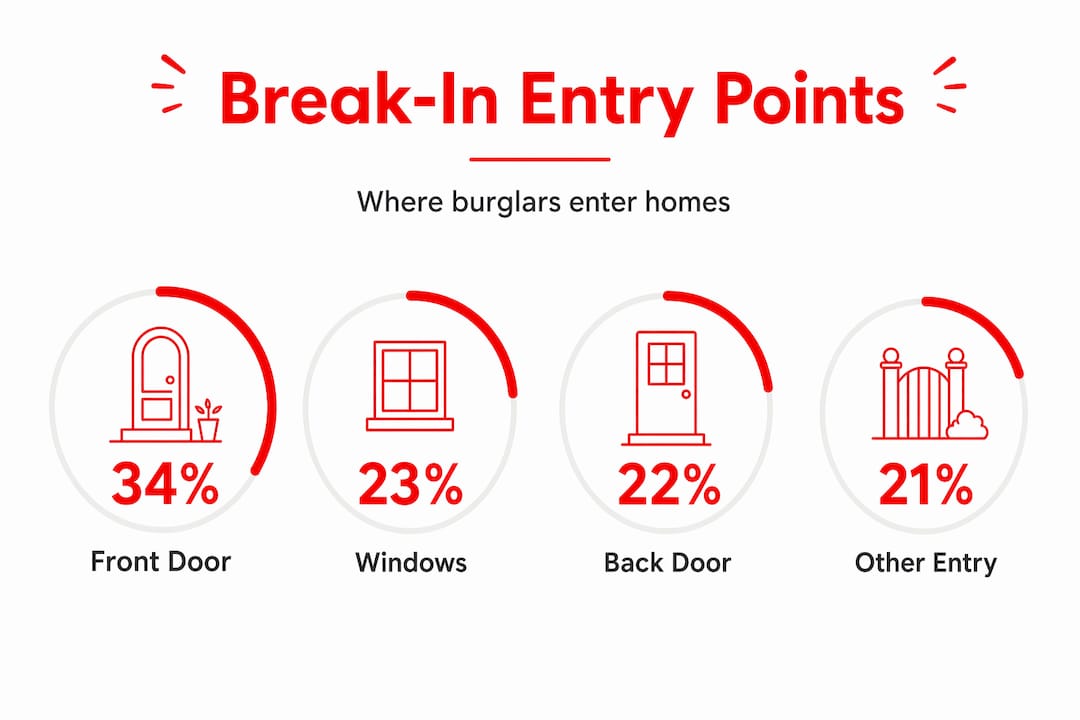
Front doors account for 34% of residential break-in entry points, followed by first-floor windows at 23% and back doors at 22%. These are not random statistics. They tell you exactly where to focus your technology investment: smart locks on every exterior door, window sensors on ground-level windows, and cameras covering the front and back of your property.
The deterrent effect of visible security technology is striking. Studies show 83% of burglars check for alarm systems before attempting a break-in, and 60% will move on entirely if they spot one. That means a visible camera, a blinking sensor light, or even a monitoring company’s yard sign does meaningful work before any alarm ever sounds.
| Security feature | Impact on burglary deterrence |
|---|---|
| Visible alarm system | 60% of burglars avoid the property |
| Smart doorbell camera | Covers primary entry point (34% of break-ins) |
| Motion-activated lighting | Removes concealment at night |
| Window and door sensors | Monitors the 45% of entries through windows and back doors |
| Professional monitoring | Emergency response triggered within 800ms of confirmed threat |
Market trends reflect growing homeowner confidence
The smart home security market is projected to surpass $112 billion by 2027. That kind of growth does not happen because people are buying gadgets for novelty. It happens because the technology is proving its worth. Notably, 74% of home buyers now prefer smart doorbells as a standard feature, which signals that advanced security systems are shifting from luxury to expectation.
Professional monitoring, which typically costs between $19 and $29 per month, adds a human response layer that pure DIY setups cannot replicate. When your system triggers and you are unreachable, a monitoring center dispatches emergency services. That response capability has a measurable effect on outcomes.
Choosing, installing, and maintaining your system
Picking the right technology matters, but so does how you set it up and whether you keep it running properly over time. A premium camera with outdated firmware and a default password offers less real protection than a mid-range camera that is properly configured and regularly maintained.
How to select the right devices
Follow this process to make a confident choice:
- Map your entry points first. Count every exterior door and ground-level window. That tells you exactly how many sensors and cameras you need before you ever open a product page.
- Check compatibility standards. Look for devices that support CSA Matter or similar interoperability protocols. This future-proofs your investment and makes adding new devices much easier later on.
- Evaluate monitoring options. Decide whether you want professional monitoring, self-monitoring through app alerts, or both. Professional monitoring adds cost but adds a response layer you cannot provide yourself when traveling or asleep.
- Prioritize verified security certifications. Choose devices from manufacturers with clear firmware update policies and hardware-attested identity. Avoid off-brand devices with no documented security practices.
- Consider a smart home setup guide to walk through installation. Getting the configuration right from day one prevents the gaps that compromise otherwise solid hardware.
Installation and ongoing maintenance
Once your devices are in place, your network configuration matters enormously. Set up a dedicated guest network or IoT-specific network for all security devices. This way, even if a device is compromised, an attacker cannot move laterally into your personal computers and phones.
Test your system monthly. Trigger sensors, check that alerts reach your phone, verify camera feeds, and confirm your hub is online and updated. Many people install their systems and forget them, only to discover during an actual event that an alert was disabled or a battery died.
Pro Tip: Set a recurring calendar reminder every 30 days to test your alarm, check camera footage clarity, and verify all firmware is up to date. It takes 10 minutes and keeps your entire system in peak condition.
Habits are what separate a system that truly protects you from one that only looks good on a spec sheet. Technology in home safety works best when it complements behaviors like consistently locking every door and window, not as a substitute for those behaviors. Burglar entry patterns consistently show that open and unlocked entry points are exploited more than any technical vulnerability. Your smart lock cannot protect you if you never engaged it.
My take on where most people get it wrong
I’ve talked with a lot of homeowners who feel genuinely protected after installing a $500 camera system. Sometimes they are. But often, the most consequential thing they did was leave their Wi-Fi router on factory settings, still broadcasting with the manufacturer’s default credentials.
What I’ve found is that people tend to over-invest in visible hardware and under-invest in the invisible infrastructure that actually keeps everything secure. The smart home hub is the real gateway to your entire setup. If someone compromises that single device, every camera feed, every lock, every sensor becomes accessible to them. Yet most people treat the hub like a utility box: plug it in and forget it. That is the single most common mistake I see.
I’ve also noticed a genuine tension that rarely gets discussed honestly: cloud connectivity gives you real convenience, and that convenience has legitimate security value. Being able to check your cameras from anywhere is not frivolous. It means you can verify a situation before calling the police, which saves everyone time. But that same cloud connection is a permanent link between your home and an external server, and your protection is only as strong as your provider’s security practices.
My honest advice? Use cloud features where they genuinely serve you, but pick providers with transparent security audits and a history of timely updates. And please, change your default passwords. I have seen sophisticated, expensive systems defeated by someone typing “admin” and “1234” into a login prompt.
Technology absolutely delivers on its promise when used correctly. But it rewards the people who understand it, not just the people who bought it.
— Alexander
Take your home upgrades further
If this article has you thinking about what else you can do to make your home safer, smarter, and more valuable, you are in the right place. Explore home improvement ideas that maximize ROI for practical technology upgrades that go beyond security and genuinely transform your space. From smart lighting to energy management, the right home improvements pay dividends in both comfort and resale value.
FAQ
What is the most effective tech for home security?
A layered system combining smart locks, motion-activated cameras, door and window sensors, and professional monitoring offers the strongest protection. Visible devices alone deter 60% of potential burglars before any alarm sounds.
Can smart home security devices be hacked?
Yes, cloud-connected devices carry real cybersecurity risks including firmware vulnerabilities and weak credentials. Using devices with hardware-attested identity standards, enabling multi-factor authentication, and keeping firmware updated significantly reduces your exposure.
How much does professional security monitoring cost?
Professional alarm monitoring typically costs between $19 and $29 per month. This service triggers emergency dispatch within 800 milliseconds of a confirmed threat, adding a critical response layer to your smart security system.
Do I need professional installation for smart security systems?
Most smart home security solutions are designed for DIY installation, but proper network configuration is critical. Following a structured setup process and segmenting your security devices onto a separate network helps prevent common vulnerabilities.
Is smart home security worth it for renters?
Absolutely. Many smart security devices are renter-friendly, requiring no drilling or permanent installation. Wireless sensors, smart doorbells, and plug-in cameras provide strong protection without modifying the property, and you take everything with you when you move.














Leave a Comment
Your email address will not be published. Required fields are marked with *