
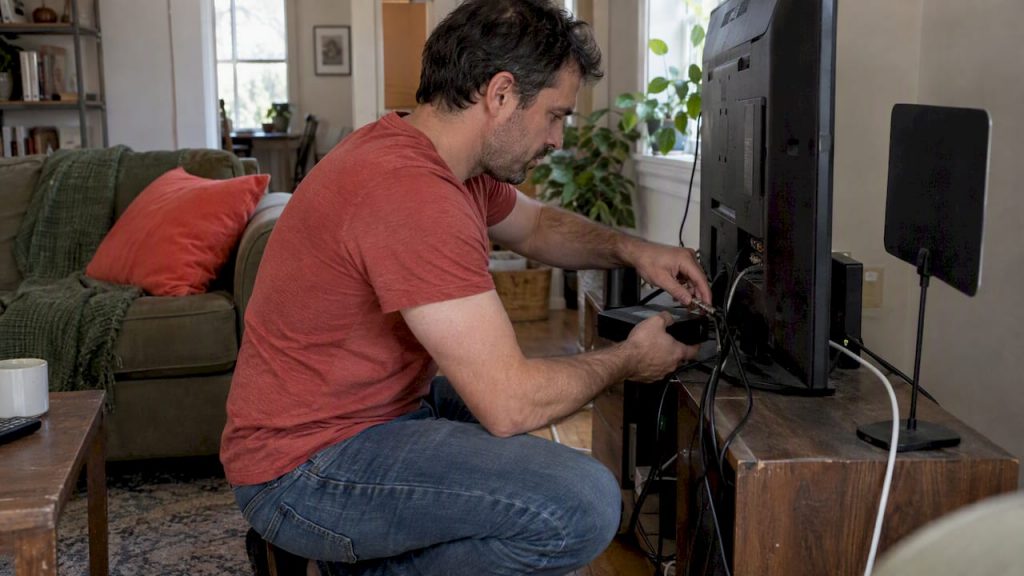
Cut cable costs in Canada and keep local channels. Pair an OTA antenna with selective streaming and use CRTC rules to cancel cable same day.
Yes, you can cut the cord in Canada and keep your local and national channels. The most practical route combines an over-the-air (OTA) antenna, one or two selective streaming subscriptions, and a quick network readiness check. Canadian rules make canceling your cable straightforward, though live sports coverage may still require a paid subscription here and there.
TL;DR:
- Starting with an indoor or outdoor antenna and a few essential streaming apps covers most households’ local and national channel needs for less than cable costs.
- Significant sports content often requires seasonal or paid subscriptions, with regional blackout rules impacting streaming availability of certain games.
- A reliable home Wi-Fi network with capable hardware and proper device setup is crucial to prevent buffering and ensure steady streaming performance.
- Canadian regulations allow cancellation of cable or satellite with no 30-day delay, so timely requests and written confirmation are essential to avoid ongoing charges.
- Avoid unlicensed IPTV services, as they pose legal risks and often lack proper licensing, making licensed apps and over-the-air options safer and more reliable.
Table of Contents
- Available replacement options in Canada: OTA, free apps, paid streaming, and IPTV explained
- OTA antenna setup in Canada: choosing, installing, and tuning for results
- How to choose streaming services and control the cost
- Home network and device checklist for reliable streaming
- How to cancel cable or a bundle in Canada and know your rights
- Sample budgets and savings for Canadian households
- Legal considerations and copyright issues around cutting the cord
- Combining streaming services to replicate a full cable lineup
- Canadian sports streaming options and blackout rules
- Troubleshooting common streaming issues in Canada
- Local content availability across streaming platforms
- Managing data usage to avoid overage charges
- Our team perspective: why a blended approach usually wins
- Explore more device and setup guides with us
- FAQ
- Sources
Available replacement options in Canada: OTA, free apps, paid streaming, and IPTV explained
Cutting the cord in Canada usually means blending a few tools rather than picking just one. Each has a different job in your household.
- Over-the-air antenna: picks up local news, major networks, and sports broadcasts for free in most urban and suburban areas, though reception depends on your distance from transmitters and the terrain around your home.
- CBC Gem: a free national streaming app covering news, drama, and sports replays, available on most major devices once you create an account with a Canadian address, according to CBC Gem’s own help center.
- Paid streaming apps: fill the gaps for movies, specialty channels, and exclusive series, but stacking too many quietly recreates a cable-sized bill.
- IPTV services: stream live channel bundles over the internet; legitimate Canadian IPTV offerings exist through licensed providers, but many unlicensed IPTV services distribute content without proper rights, which creates real legal exposure for subscribers.
The trick is sequencing: start with OTA and free apps, then add only the paid services that cover content you genuinely watch. Subscription creep, adding one app after another without canceling the last, is the single biggest reason cord cutters end up paying close to their old cable price within a year.
OTA antenna setup in Canada: choosing, installing, and tuning for results
Before buying anything, confirm your television has a digital tuner. Many displays, especially monitors sold as TVs, do not include one and need an external tuner box to receive broadcast signals, a gap flagged in TCL Canada’s cord cutting guide.
- Check your tuner. Look in your TV’s settings menu for “antenna” or “air” channel scanning; if it is missing, buy a standalone digital tuner box.
- Pick indoor or outdoor. Choose based on distance from transmitters and obstacles like hills or dense tree cover; an outdoor or attic antenna generally outperforms an indoor model beyond a few kilometers from the tower.
- Check your allotment. Reception depends on topography, tower distance, and frequency allotments set out in ISED’s digital television allotment plan, not on marketing claims about an “HD antenna,” a label that does not correspond to any real technical standard.
- Place and point. Mount as high as practical, away from metal siding and large appliances, and aim roughly toward the transmitter cluster serving your area.
- Scan and save. Run your TV’s or tuner’s channel scan, save the results, and rescan periodically since allotments occasionally shift.
Pro Tip: A basic over-the-air DVR or a networked tuner box lets you record live broadcasts the same way a cable PVR does, without a monthly rental fee.
How to choose streaming services and control the cost
Before subscribing to anything, write down what your household actually watches in a normal week: local news, a handful of dramas, a sports league, maybe a kids’ channel. Match each item to the cheapest service that covers it rather than guessing.
- Audit first, subscribe second: list must-have shows and leagues, then find which single app covers the most of that list.
- Add up the real total: combine your chosen apps’ monthly costs and compare the sum directly against your old cable bill, not against each app in isolation.
- Rotate instead of stacking: keep a service for the season you need it (a streaming drama, a playoff run) and cancel once it’s done, rather than letting subscriptions pile up indefinitely.
- Share sensibly: use household or family plans where a provider explicitly allows them, and avoid informal sharing that violates a service’s terms.
Sports are usually the line item that breaks a cord-cutting budget, since major leagues often sit behind their own dedicated subscription. Decide in advance whether you need year-round sports access or just a few months during playoffs, and buy accordingly instead of defaulting to an annual plan.
Home network and device checklist for reliable streaming
A shaky router undoes every other decision on this list. Before blaming a streaming app for buffering, check the basics.
- Bandwidth per stream: plan for roughly 5 to 25 Mbps per simultaneous stream depending on resolution, with 4K video needing the high end of that range and some headroom on top for other devices.
- Router age: a router more than four or five years old often lacks modern Wi-Fi standards; upgrading can fix buffering that has nothing to do with your streaming subscriptions.
- Quality of Service (QoS): enabling QoS on a compatible router lets you prioritize streaming traffic when several people are online at once.
- Dual-band and placement: keep your router central and elevated, away from walls and appliances, and use the 5GHz band for streaming devices close to the router.
- Device choice: native streaming apps on a dedicated device or stick generally outperform a smart TV’s built-in browser.
CBC Gem lists supported devices including Roku, Apple TV, Android TV, Fire TV, select Samsung and LG televisions, and Xbox, according to CBC Gem’s device support page; smart TV browsers often lack the DRM support these apps need, which is why a native app or an external streaming box tends to deliver a steadier picture. For a deeper comparison of streaming devices and which ones pair best with your router setup, our guide to comparing streaming devices walks through the tradeoffs, and our Wi-Fi improvement tips can help if your signal weakens upstairs.
How to cancel cable or a bundle in Canada and know your rights
Canadian cable subscribers have more leverage than many assume. The CRTC’s 2015 regulatory decision prohibits broadcasting distribution undertakings from imposing mandatory 30-day cancellation notice periods, meaning your cancellation takes effect the day your provider receives the request, not 30 days later.
- Review your current plan and note your contract end date if you’re still within a term.
- Call to cancel, state clearly that you want full cancellation of your broadcasting distribution service, and ask for written confirmation of the effective date.
- Hold providers to the TVSP Code, which requires clear pricing, trial periods, and transparency around service calls from most Canadian TV providers.
- Escalate if needed to the Commission for Complaints for Telecom-television Services (CCTS) if a provider resists or delays your cancellation.
Sample budgets and savings for Canadian households
Three common setups show how the math plays out. These are illustrative examples, not published pricing data, meant to show the calculation method rather than current market rates.
- Solo viewer: antenna amortized over a few years plus one streaming app, a modest monthly total well below a typical cable package.
- Family household: antenna plus two or three apps covering kids’ content, drama, and movies, still landing under most cable bundles.
- Sports-focused household: antenna plus a seasonal sports subscription added only during the relevant season, then canceled.
To build your own number: add your internet bill, your chosen streaming subscriptions, and a small monthly allowance for antenna and device cost spread over their expected lifespan. Compare that total line by line against your last cable statement.
Legal considerations and copyright issues around cutting the cord
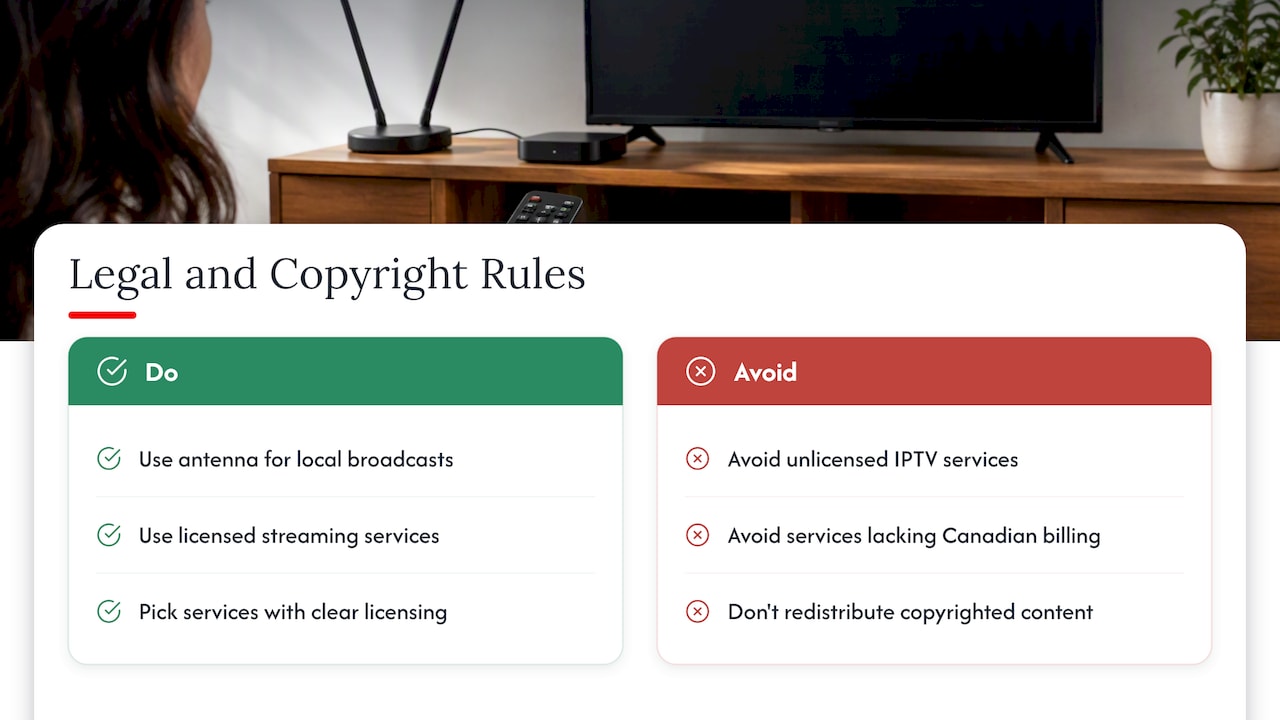
Watching free-to-air broadcasts with an antenna is entirely legal in Canada; these signals are deliberately transmitted for public reception and ISED’s allotment framework exists specifically to manage that spectrum. Subscribing to a licensed streaming service, whether it’s a Canadian app or an international one with proper distribution rights, is equally straightforward from a legal standpoint.
The gray area, and the one that causes real trouble, is unlicensed IPTV. Many services marketed as cheap “all-in-one” live TV packages retransmit broadcast and cable content without holding the rights to do so. Subscribing to one of these does not carry the same legal weight as, say, recording a show for personal use, which Canadian copyright law has long permitted. Streaming or redistributing copyrighted content without authorization exposes both the service and, in some cases, the subscriber to legal risk, and quality or reliability on these platforms tends to be inconsistent since they operate outside any official distribution agreement.
A simpler rule of thumb: if a service is significantly cheaper than every other option for the same channel lineup and doesn’t ask for a Canadian billing address or show any sign of a licensing relationship with broadcasters, treat that as a signal to look elsewhere. Sticking to recognized broadcasters, licensed streaming apps, and your own antenna keeps you on solid ground without sacrificing much in the way of content.
Combining streaming services to replicate a full cable lineup
The goal isn’t to find one app that does everything, because that app doesn’t exist. Instead, think of your lineup as three layers stacked on top of each other.
The base layer is free: your antenna for live local news and major network programming, plus CBC Gem for a wide slice of Canadian content at no cost. The second layer is one or two paid subscriptions chosen specifically for your household’s must-watch list, the dramas, documentaries, or movie libraries that your audit from earlier identified as non-negotiable. The third layer is seasonal and temporary: a sports package, a limited-run series, or a specialty app you add for a month or two and then cancel.
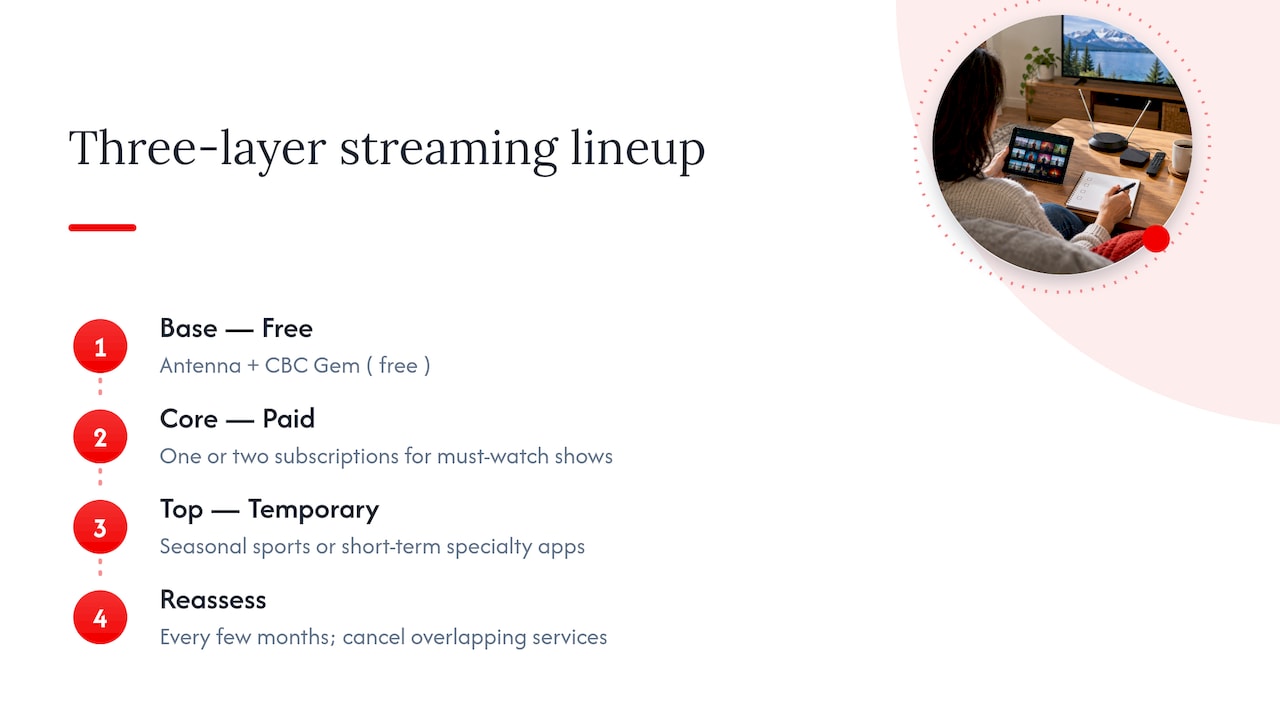
Reassess this stack every few months. Content moves between platforms regularly, and a show that justified a subscription last year may have shifted elsewhere. Keep a simple note, even just in your phone, listing which app covers which show, so you can spot overlap or redundancy quickly. When two subscriptions start covering the same ground, that’s your cue to drop one.
This layered approach tends to land closer to half of a typical cable bill while still covering the content most households actually watch, rather than the much larger channel count that comes bundled into cable packages but rarely gets watched.
Canadian sports streaming options and blackout rules
Sports remain the toughest content category to replace for free, and they’re often the deciding factor in how much a cord-cutting household ends up spending. Many major leagues and events sit behind dedicated paid streaming packages in Canada, separate from general entertainment apps, and these packages are frequently priced and sold on a seasonal basis.
Blackout rules add another layer of complexity. Certain games are restricted from streaming or broadcast in specific regions due to broadcast rights agreements, meaning a local game might be unavailable on a national feed even when you’re paying for the service. These restrictions are set by the leagues and broadcasters holding regional rights, not by the streaming platform itself, so switching apps won’t necessarily get around a blackout.
Your OTA antenna still has a role here: many marquee games and playoff broadcasts air on conventional over-the-air networks, meaning a well-placed antenna can cover a meaningful chunk of sports viewing without any subscription at all. For the games that land exclusively behind a paid package, the seasonal subscribe-then-cancel approach from earlier in this guide keeps costs contained. Buying a single-month pass around playoff time, rather than a year-round subscription, is usually the better move unless you follow a sport closely across its full season.
Troubleshooting common streaming issues in Canada
Most streaming problems trace back to one of three causes: the network, the device, or the app itself. Working through them in that order saves time.
Start with your network. Run a speed test at the device you’re streaming on, not just on your phone near the router, since Wi-Fi strength varies by location in a home. If speeds are inconsistent, check our Wi-Fi troubleshooting guide for fixes that don’t require new hardware, and our tips on improving signal strength upstairs if your bedroom or office is farther from the router.
If the network checks out, look at the device. Restart it, confirm the app is updated to its latest version, and clear the app’s cache if that option is available. Older streaming sticks and smart TV apps sometimes struggle to keep pace with evolving DRM requirements, which can cause playback errors that have nothing to do with your internet connection.
If the issue is specific to one app while others work fine, the problem usually sits with that service rather than your setup. Check the provider’s status page or social accounts for outage reports before spending more time on your own equipment. For OTA reception issues specifically, rescan your channels, since allotments and signal strength occasionally shift, and confirm your antenna is still pointed correctly after any storms or repositioning.
Local content availability across streaming platforms
Canadian content availability varies more than many new cord cutters expect. Some shows and movies available on a platform in another country simply aren’t licensed for Canadian release on that same platform, which can be confusing if you’ve used a service abroad and expect an identical catalog at home.
CBC Gem remains the most reliable source for Canadian-produced news, drama, and documentary content, and it receives regular catalog updates, including a fresh round of additions reported by the CBC Media Centre. Other Canadian broadcasters maintain their own apps for local news and regional programming, often free with a cable login or, in some cases, free outright.
For anyone watching on a mobile device, whether at home or while traveling within Canada, having a reliable mobile data plan matters as much as a strong home Wi-Fi signal. Services like WayfarerSIM’s Canada eSIM plans offer a straightforward way to stay connected to streaming apps without relying solely on a home network, which is worth considering if you split time between locations.
When in doubt about whether a specific show or local broadcast is available on a given app, check the app’s own catalog search rather than assuming availability based on experience with the same platform elsewhere.
Managing data usage to avoid overage charges
Streaming video, especially in 4K, consumes a meaningful amount of data, and Canadian internet plans sometimes come with data caps that can turn a cord-cutting household’s savings into unexpected overage fees.
Start by checking your plan’s cap, if any, and your typical household streaming hours per day. Most streaming apps let you set a default playback quality in their settings menu; dropping from 4K to 1080p or even standard definition on a secondary TV can cut data usage substantially without a noticeable difference on a smaller screen. Downloading shows for offline viewing on a phone or tablet, where that option exists, also avoids repeated streaming over the same data.
If your household streams heavily across multiple devices at once, keep an eye on your provider’s usage dashboard partway through each billing cycle rather than waiting for the bill to arrive. Adjusting playback quality for a few days can bring a month back under its cap before it becomes a real charge.
Our team perspective: why a blended approach usually wins
We generally recommend starting with an antenna and one or two core streaming subscriptions, then adjusting network settings only where streaming actually struggles. Canadian cancellation rules make this approach low-risk to test, since you’re never locked into a 30-day wait to walk away from cable. The real savings discipline isn’t picking the right apps once. It’s revisiting that list every few months before subscription creep quietly rebuilds a cable-sized bill.
— Alexander
Explore more device and setup guides with us
We publish ongoing guides comparing streaming devices, router setups, and home tech choices for Canadian households working through exactly this kind of transition. If you run a business and want to reach readers researching these decisions, our advertise with us page outlines partnership options including banner ads and guest posts.
- Browse device comparisons before buying new streaming hardware.
- Reach out through our advertising page if you want to partner with our content.
FAQ
How do I cut the cable cord for beginners?
Start by confirming your TV has a digital tuner, then add an antenna for local channels and one streaming app covering your must-watch content. Cancel your cable using your provider’s standard process, since CRTC rules mean the cancellation takes effect as soon as your provider receives the request, with no mandatory 30-day wait.
Is cutting the cable cord worth it in Canada?
For most households, yes, especially once you combine a free antenna with a small, deliberately chosen set of streaming apps instead of replicating every cable channel. The savings depend heavily on avoiding subscription creep, where unused apps quietly add back the cost you just cut.
What are the best alternatives to cable in Canada?
The most effective combination is an OTA antenna for local and network channels, CBC Gem for free national content, and one or two paid streaming apps chosen to match your actual viewing habits. Avoid unlicensed IPTV services, since many operate without proper distribution rights.
Do I need a special antenna for HD channels?
No, there is no technical standard behind the term “HD antenna,” since reception depends on your distance from transmitters, local topography, and the frequency allotments set out in ISED’s DTV allotment plan. A well-placed standard antenna will receive high-definition broadcasts just as well as one marketed specifically as “HD.”











Leave a Comment
Your email address will not be published. Required fields are marked with *