
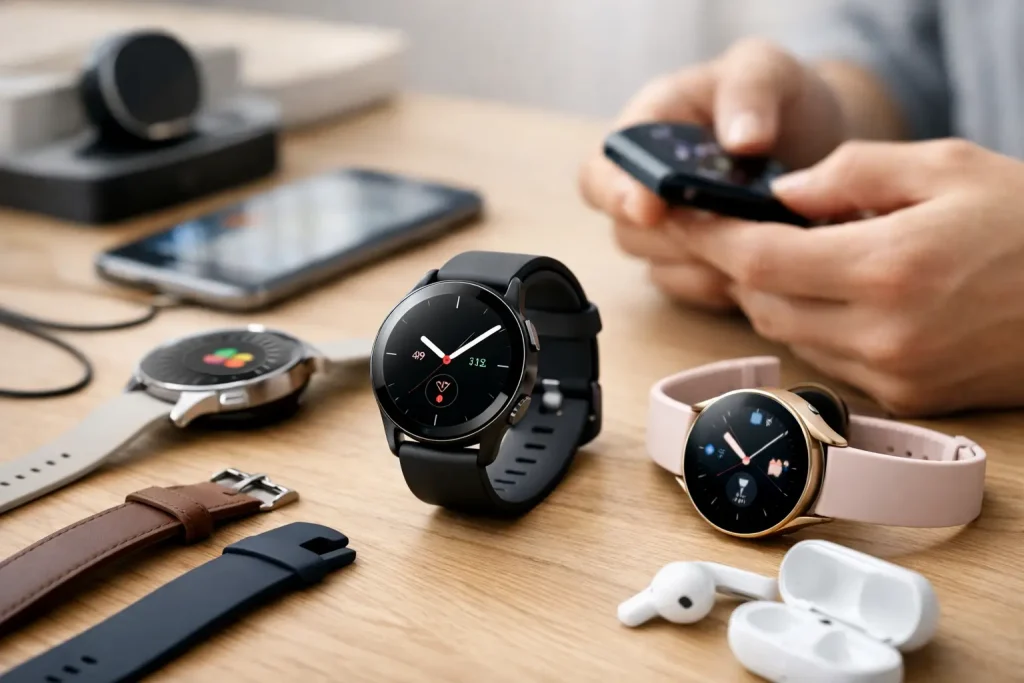
Our smartwatch review for beginners explains features, fit, battery life, health tools, and value so you can choose a watch you will actually use daily.
A smartwatch can look like a tiny phone for your wrist, but the best first purchase is usually much simpler than that. This smartwatch review for beginners focuses on the features that make a real difference after the novelty wears off: compatibility, comfort, battery life, health tracking, and whether the watch makes everyday routines easier.
The wrong smartwatch is not necessarily a bad product. It may just be a great fitness watch for someone who wants a full week of hiking metrics, or a premium phone companion for someone who answers messages from their wrist all day. For a first-time buyer, the goal is to find the version you will comfortably wear, understand, and charge consistently.
Start With Your Phone, Not the Watch
Phone compatibility is the first filter, and it can rule out attractive options immediately. Apple Watch models are designed for iPhones. Samsung Galaxy Watch models and Google Pixel Watch models are built primarily around Android, with the best experience on their respective phone brands. Fitbit and Garmin devices tend to work with both iPhone and Android, although particular features can vary.
Do not assume that a watch with Bluetooth will work equally well with every phone. A beginner should confirm that the watch supports their phone’s operating system, the current version of that software, and the apps they expect to use. This takes a few minutes before buying and can prevent a frustrating setup experience later.
It also helps to think about what you want notifications to do. Most smartwatches can display calls, texts, calendar alerts, and app notifications. The more advanced models may let you reply to messages, take calls, use voice assistants, control music, or pay at checkout. Those extras are convenient, but they matter less if you usually keep your phone nearby.
Smartwatch Review for Beginners: Features Worth Paying For
A first smartwatch does not need every available sensor. It needs the features that match your habits. For many people, reliable step tracking, heart-rate monitoring, sleep data, timers, weather, and notification controls are plenty.
Health tracking should be useful, not overwhelming
Most current watches track steps, active minutes, workouts, heart rate, and sleep. These tools can be surprisingly motivating because they turn vague intentions, such as taking more walks, into visible patterns. A watch can also nudge you to stand, move, or begin a short breathing session during a hectic day.
Still, more data is not always better. Some devices offer ECG readings, blood oxygen measurements, skin temperature trends, stress estimates, fall detection, and recovery scores. These may be valuable for certain users, but they are not a substitute for medical care or diagnosis. A beginner who wants healthier routines may get more value from accurate basics than from a dashboard full of numbers they do not know how to interpret.
Sleep tracking is a good example. If you are curious about bedtime consistency and total sleep, a watch can provide a useful overview. If wearing a device overnight feels distracting or uncomfortable, that feature will not help much. Comfort wins.
Battery life changes the experience
Battery expectations vary dramatically. Full-featured smartwatch models often need charging every day or every other day, especially with an always-on display, frequent workouts, GPS, and sleep tracking. Fitness-focused watches can last several days or even longer, but may offer fewer apps, calling features, or rich display options.
There is no universal winner. Daily charging is easy if you already charge your phone beside the bed and do not plan to track sleep every night. Longer battery life is more valuable if you travel, forget chargers, spend time outdoors, or want continuous sleep tracking without planning your routine around a charging cable.
Before buying, check both typical battery claims and the charging method. A compact magnetic charger is convenient at home but easy to leave behind on a trip. Wireless charging may be helpful, though it is not available on every device.
GPS, cellular, and music are optional upgrades
Built-in GPS records outdoor walks, runs, bike rides, and hikes without relying entirely on your phone. It is useful for active buyers, but it can drain battery more quickly. If your workouts are mostly on a treadmill, in a gym, or around your neighborhood with your phone in hand, it may not be a deciding factor.
Cellular service lets a smartwatch make calls, send messages, stream music, or use data when your phone is not nearby. It can be freeing for runners, parents, and people who dislike carrying a phone on short errands. It also costs more upfront and may add a monthly carrier fee. For most beginners, a Bluetooth or Wi-Fi model is the smarter place to start.
Offline music is another nice-to-have feature. It makes sense for people who exercise without a phone, especially if wireless earbuds are already part of the routine. Otherwise, it is not worth letting it drive the whole purchase.
Fit and Screen Size Matter More Than You Think
A smartwatch is only useful when it is on your wrist. That makes size, weight, and band comfort central buying criteria, not cosmetic details. Larger cases offer more room for text, maps, and workout stats, but they can feel bulky on smaller wrists or catch on jacket sleeves. Smaller models tend to be lighter and less noticeable, although the screen may be harder to read.
If possible, try on a similar-sized watch before ordering. Pay attention to the case thickness as well as the diameter. A watch that looks sleek in photos can feel surprisingly tall when worn overnight or while typing.
Bands deserve the same attention. Silicone is practical for sweat and workouts, woven nylon can feel lighter, leather looks polished but is less ideal for frequent exercise, and metal can be durable but heavier. Check whether replacement bands are easy to find and whether the watch uses a proprietary attachment system.
Display style is partly personal preference. Bright, colorful screens make notifications and workout data easy to see. Simpler displays generally consume less power and may be easier to read outside. Always-on screens are convenient but reduce battery life, so consider whether glancing at the time without raising your wrist is worth the trade-off.
Choose a Watch Category Before Choosing a Brand
Instead of comparing every model on the market, begin with the category that fits your lifestyle.
A full smartwatch is best for people who want phone-like features on their wrist. Expect notifications, apps, contactless payments, voice controls, and a sharp screen. Apple Watch, Galaxy Watch, and Pixel Watch models fit this category well, depending on your phone.
A fitness tracker is often the easiest entry point for someone focused on steps, sleep, workouts, and lighter weight. It may have fewer apps and a smaller screen, but it typically costs less and lasts longer between charges. Fitbit-style devices are popular examples of this approach.
A sport watch is designed for buyers who care about training data, outdoor navigation, GPS performance, and extended battery life. Garmin-style watches are common in this category. They can be excellent tools, but some models offer more detail than a casual beginner needs.
A hybrid watch may resemble a traditional analog watch while adding basic activity tracking and notifications. This category suits buyers who want subtle technology and do not want a bright screen competing for attention.
Avoid Paying for Features You Will Not Use
Smartwatches range from affordable trackers to premium devices that cost as much as a midrange phone. Higher prices can bring better materials, brighter displays, deeper software integration, advanced sensors, cellular capability, and larger app libraries. They do not automatically guarantee that you will use the watch more often.
Set a budget based on your main reason for buying. If you want a daily activity reminder and sleep trends, an entry-level tracker may be enough. If you want to leave your phone at home, navigate routes, answer messages, and pay for coffee from your wrist, spending more on a full smartwatch can make sense.
Watch for recurring costs, too. Some health insights, workout programs, or detailed reports may sit behind a subscription. A subscription is not automatically a deal-breaker, but make sure the free experience covers the information you actually want. Also consider warranty coverage and how long the manufacturer typically supports software updates.
Set Up Your First Watch for Real Life
After pairing the watch, resist the urge to turn on every notification. Start with calls, texts, calendar alerts, and one or two genuinely useful apps. A wrist that buzzes for every sale, social reaction, and news alert becomes annoying fast, and many people stop wearing their watch because of notification fatigue.
Set realistic activity goals during the first week. Your initial step count and sleep schedule create a more useful baseline than a generic goal that feels impossible. Try one small use case at a time: tracking lunchtime walks, using a timer while cooking, or checking tomorrow’s first appointment without grabbing your phone.
A smartwatch earns its place when it reduces friction, not when it adds another screen to manage. Choose the device that supports the routines you already want to build, then give yourself a week to learn which alerts and health tools truly deserve space on your wrist.


















Leave a Comment
Your email address will not be published. Required fields are marked with *