
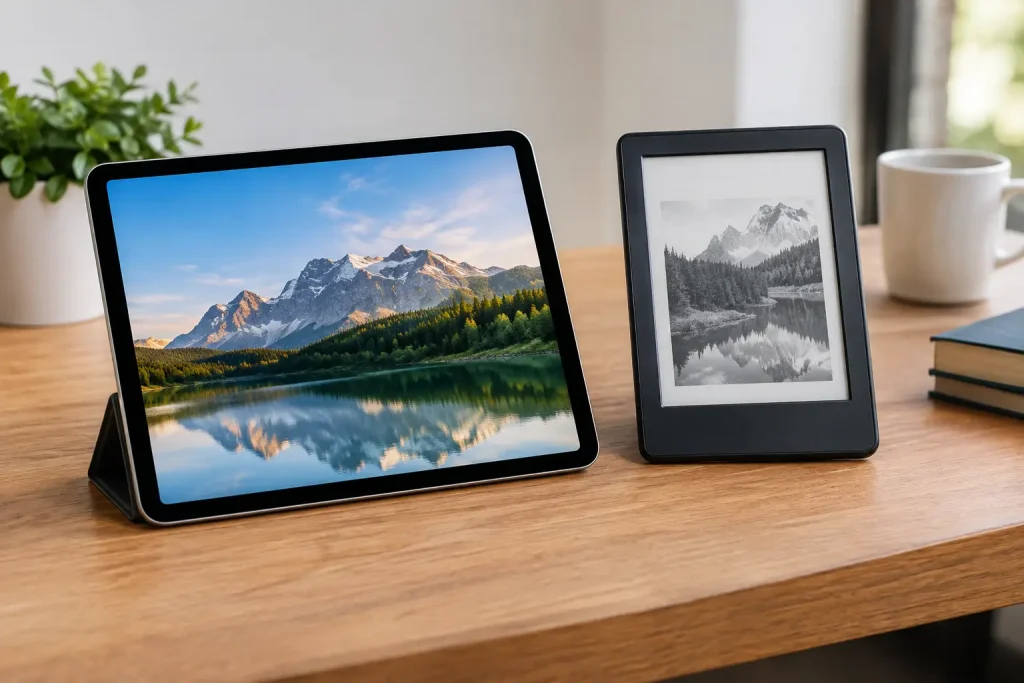
Our tablet versus e-reader comparison breaks down screens, battery life, apps, price, and comfort so you can choose the right device for reading at home.
A tablet can put a whole library, a streaming service, a web browser, and a grocery list in one slim device. An e-reader does far less, yet it often delivers a better reading experience. This tablet versus e-reader comparison comes down to what happens after you settle into a chair with a book: Do you want a device built to keep you entertained, or one designed to keep you reading?
For many shoppers, the answer is not about which device is objectively better. It is about where, when, and how long you read. A frequent traveler may value an e-reader’s battery life and sunlight-friendly screen, while a student or casual reader may get more value from a tablet that also handles notes, video calls, and apps.
Tablet vs. E-Reader: The Core Difference
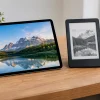
A tablet is a compact computer with a color, backlit display. It runs apps, plays movies, supports games, handles email, and can usually switch from an e-book to a video in seconds. Devices such as an iPad, Samsung Galaxy Tab, or Amazon Fire tablet fit this category, although their speed, screens, and price points vary widely.
An e-reader is a purpose-built reading device, most often using an E Ink screen. Rather than shining light directly at your eyes like a phone or tablet, its display reflects ambient light much like printed paper. Popular e-readers can store thousands of books, offer adjustable type, and provide access to digital libraries or e-book stores, but they are intentionally limited when it comes to apps and entertainment.
That limitation is a feature for readers who want fewer interruptions. On a tablet, a notification, tempting game, or incoming message is always close by. On an e-reader, the next chapter is usually the only thing competing for your attention.
Screen Comfort Is the Biggest Divider
If you regularly read outside, an e-reader has a clear advantage. E Ink displays remain easy to see in bright daylight, whereas even a good tablet screen can become reflective and hard to read at the pool, park, or beach. An e-reader also tends to feel more like a printed page, with less glare and a calmer visual presentation.
Tablets win on color and versatility. Illustrated children’s books, cookbooks, comics, magazines, textbooks, and PDFs with charts look dramatically better on a color screen. A large tablet can also make zooming into diagrams or switching between a textbook and an assignment much easier than on a smaller e-reader.
Both device types now commonly include adjustable front lighting and warmer color settings for nighttime reading. Still, people who get tired after long sessions on bright screens often prefer E Ink. A tablet can be comfortable for an hour or two, but an e-reader is generally the stronger choice for someone finishing novels over long weekends.
What About Eye Strain?
Eye strain is personal, and brightness settings, room lighting, text size, and breaks matter on any device. But readers who already spend all day looking at a computer monitor may appreciate using an e-reader at night because it does not feel like adding another conventional screen to the day.
If you choose a tablet, use a reading app’s dark mode or warm display setting, reduce brightness, and increase the font size. Those small adjustments can make a noticeable difference.
Battery Life Favors E-Readers by a Mile
An e-reader can typically last for weeks on a single charge, depending on front-light use, wireless settings, and daily reading time. E Ink technology uses very little power because it mainly draws energy when the page changes. That makes an e-reader especially convenient for flights, camping trips, and vacations where packing another charger is a nuisance.
Most tablets need charging every day or every few days, particularly when used for streaming, gaming, browsing, or video calls. That is not necessarily a deal-breaker. Many people already charge a phone and smartwatch nightly, so adding a tablet may not change their routine. But an e-reader is far more forgiving when you forget.
Apps, Notes, and Entertainment Make Tablets More Useful
A tablet earns its higher level of distraction by being useful for much more than books. You can borrow e-books through a library app, listen to audiobooks, annotate documents, join a class video call, follow a recipe in the kitchen, and watch a show during a flight. For families, one tablet can serve several needs with separate user profiles or kid-friendly controls.
Tablets are also usually better for readers who buy or borrow books from multiple sources. E-readers can have ecosystem restrictions or require extra steps to load certain file types. Before buying, check where you already get books. If your digital library, favorite reading subscription, or professional documents do not work easily with a particular device, a low sticker price can quickly feel less appealing.
E-readers are catching up in a few areas. Some models support audiobooks, note-taking, web browsing, and limited app access. However, their slower refresh rates and pared-down interfaces mean these are secondary features, not reasons to replace a tablet.
Price Depends on What You Already Own
Entry-level e-readers are often less expensive than premium tablets, and they can be an excellent value if reading is your main goal. A basic model with a front light may be enough for most novel readers, while waterproofing, extra storage, and larger screens raise the cost.
Tablets cover a much wider price range. Affordable models work well for casual reading and streaming, while higher-end options add sharper screens, faster performance, stylus support, and laptop-like accessories. The smartest purchase is not always the most capable device. It is the one you will use enough to justify the cost.
Consider the hidden costs, too. A protective case, screen protector, stylus, keyboard, storage upgrade, and paid apps can add to a tablet purchase. With an e-reader, the ongoing expense is more likely to be books or a reading subscription.
Who Should Buy an E-Reader?
Choose an e-reader if reading books is your main priority and you want the device to disappear into the background. It is particularly well suited to avid fiction readers, commuters, travelers, beach readers, and anyone who wants a lightweight library without the glare and constant alerts of a tablet.
It is also a practical gift for a reader who says they miss getting through books. The focused design removes friction: the device wakes up, opens the book, and asks very little else from you. For some people, that simplicity is more valuable than a long feature list.
A waterproof e-reader makes particular sense if you read in the bathtub, by the pool, or on vacation. Just remember that water resistance does not make every charging port, case, or accessory waterproof.
Who Should Buy a Tablet?
Choose a tablet if your reading includes color-heavy content, school materials, PDFs, web articles, or magazines. It is also the better all-around option for a person who wants one portable screen for books, shows, browsing, recipes, games, and light work.
A tablet may be the better buy for occasional readers. If you finish only a few books each year, dedicating money and drawer space to a single-purpose device may not make sense. A tablet lets you read when the mood strikes while still serving plenty of other everyday jobs.
Parents may also prefer a tablet for its broader mix of educational apps and entertainment. The trade-off is supervision. A device that can teach, entertain, and communicate can also pull a child away from reading faster than a purpose-built e-reader.
Make the Choice Based on Your Real Reading Habits
Before shopping, think about your last three reading sessions rather than your ideal routine. Did you read a novel in bed, look at a cookbook on the counter, study a textbook with graphics, or scroll articles between appointments? Your answer points toward the better device.
If you are torn, prioritize the screen you will enjoy looking at for hours. An e-reader is the better specialist, while a tablet is the better multitasker. Readers who want fewer distractions and a paper-like page will rarely regret choosing E Ink; readers who need color, apps, and flexibility will get more daily use from a tablet.
The best device is the one that makes reaching for your next book feel easy. Pick the tool that fits your actual life, charge it, load a title you have been meaning to read, and give yourself a quiet hour to use it.














Leave a Comment
Your email address will not be published. Required fields are marked with *