

Learn how to fix phone overheating issues fast with simple, effective tips. Act quickly to protect your device and avoid serious damage.
Phone overheating, known technically as thermal throttling when left unchecked, is fixed fastest by stopping heat-generating activities the moment you notice your device getting uncomfortably warm. Your phone’s processor, battery, and display all generate heat during normal use, but excessive warmth triggers automatic slowdowns, warning screens, and in serious cases, permanent battery damage. Knowing how to fix phone overheating issues fast means acting within the first few minutes, not waiting for your device to shut itself down. The good news is that most fixes require zero tools and take less than five minutes to work.
What causes your phone to overheat rapidly?
Phone overheating has a handful of reliable culprits, and spotting the right one speeds up your fix considerably. Understanding common overheating causes puts you ahead of the problem before it gets serious.
Processor-heavy apps
Gaming, video recording, GPS navigation, and streaming video push your processor and GPU to near-maximum output. That sustained load generates heat faster than your phone’s passive cooling system can release it. Even a 20-minute gaming session in a warm room can push a mid-range device into warning territory.

Charging methods
Fast charging and wireless charging both generate more heat than standard wired charging. Wireless charging inefficiency creates direct heat in the phone’s back panel, which compounds the problem when your device is already warm. Running a navigation app while wirelessly charging in a hot car is one of the fastest ways to trigger an overheating warning.
External environment
Direct sunlight is a major trigger. A phone left on a car dashboard in summer can reach dangerous temperatures within minutes, even without any apps running. Hot ambient environments reduce your phone’s ability to shed heat because the temperature difference between the device and the surrounding air shrinks.
Phone cases as heat traps
Most phone cases, especially thick silicone or leather styles, act as insulation. They hold heat against the device instead of letting it escape. This is rarely a problem during light use, but during charging or gaming, a case can add several degrees to your device’s surface temperature.
The four main triggers at a glance:
- Processor-heavy apps: gaming, streaming, navigation, video recording
- Charging: fast charging, wireless charging, charging while using the phone
- Environment: direct sunlight, hot rooms, car dashboards
- Accessories: thick or insulating phone cases
Immediate steps to cool down your phone quickly
These steps work best when applied together and in order. Cooling your phone fast comes down to removing heat sources and improving airflow simultaneously.
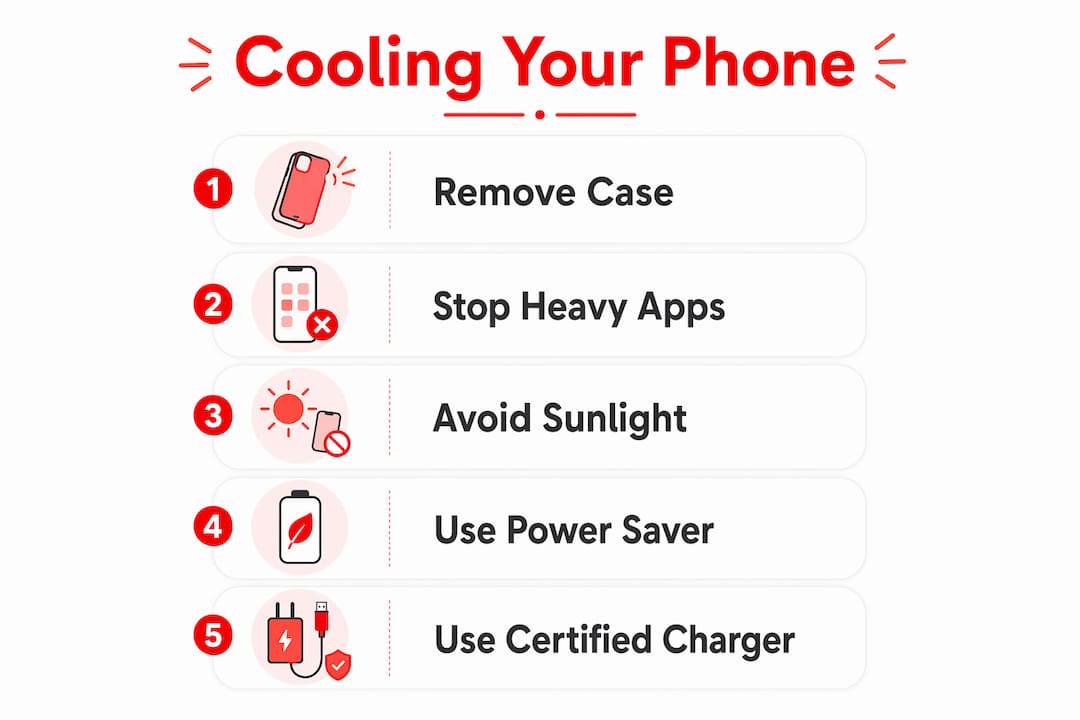
- Close resource-heavy apps immediately. Swipe away any game, video, or navigation app you have open. Stopping heat-generating activities can cool a phone within 2–5 minutes for tasks like gaming or video recording. That is a fast result for zero effort.
- Remove the phone case. Peel off the case right away. Removing the case is categorized as a 1-minute fix for thermal relief. Your phone’s metal or glass back panel is designed to conduct heat outward, and the case blocks that process.
- Unplug the charger. Charging adds heat to an already stressed battery. Disconnect the cable or remove the phone from the wireless pad immediately. Do not resume charging until the device feels cool to the touch.
- Move to a cooler location. Step away from direct sunlight or a hot room. Moving from direct sun to shade can take 5–15 minutes to show full effect, but the improvement starts immediately. Air conditioning accelerates the process noticeably.
- Place the phone on a hard, flat surface. Set it face-up on a table, desk, or countertop. Soft surfaces like beds or pillows trap heat and delay cooling significantly compared with hard surfaces. The physics here are straightforward: hard surfaces allow airflow beneath the device, which carries heat away through convection.
- Lower screen brightness and disable extras. Drag brightness to its lowest comfortable level. Turn off Bluetooth, Wi-Fi, and mobile data if you are not actively using them. Each of these features draws power and generates a small but real amount of heat.
Pro Tip: If you are in a hot car, place your phone on a vent mount near the air conditioning outlet. Directing cool air across the device is one of the fastest passive cooling methods available without any accessories.
How to adjust your phone settings to prevent repeated overheating
Quick fixes stop the immediate problem. Settings adjustments stop it from coming back. These changes take a few minutes to configure and pay off every day.
Disable fast charging when you do not need speed. Disabling fast charging reduces heat generated during recharge, especially on Samsung devices. On most Android phones, find this under Settings > Battery > More battery settings. On a standard overnight charge, you rarely need fast charging anyway.
Enable power saver mode proactively. Most people activate power saver only when the battery is nearly dead. Power saver modes limit processor speed, screen resolution, and refresh rate to reduce heat as a preventive step. Turning it on before a long gaming session or a hot outdoor day keeps temperatures in check before they spike.
Manage background apps sensibly. Here is a counterintuitive truth: closing all background apps aggressively can consume more power and worsen overheating in some cases. Your phone’s operating system manages background processes more efficiently than constant manual closing does. Close apps only when you are troubleshooting a specific heavy app that you know is running hot.
Additional settings worth adjusting:
- Set adaptive brightness to automatic so the screen does not stay at full power unnecessarily
- Reduce screen refresh rate to 60Hz when not gaming (available on most flagship devices)
- Turn off location services for apps that do not need them
- Disable push email and set accounts to fetch manually or on a longer schedule
- Keep your software updated, since manufacturers regularly release patches that improve thermal management
Pro Tip: Reboot your phone in safe mode if overheating persists after all other adjustments. Safe mode disables third-party apps, which helps you identify whether a downloaded app is the source of the problem. If the phone runs cool in safe mode, a recently installed app is likely the culprit.
Charging habits and accessories that reduce heat buildup
How and where you charge your phone has a direct impact on how hot it gets. Small habit changes here protect both your battery and your device’s long-term health.
Choose the right charger and cable. Using the original charger or a certified brand avoids unstable power delivery that increases device heat during charging. Cheap, uncertified adapters deliver inconsistent voltage, which forces the battery to work harder and run hotter. Look for USB-IF certified cables and chargers that match your phone’s rated wattage.
Prefer wired charging over wireless when your phone is already warm. Wireless charging is less thermally efficient and can cause rapid temperature increases on an already hot device. The induction process generates heat in the back panel, creating a compounding effect. Switch to a standard wired connection when temperatures are elevated.
Key charging habits that reduce heat:
- Avoid charging in direct sunlight or on hot surfaces like car seats
- Remove the phone case while charging for better heat dissipation
- Do not use the phone for gaming or video streaming while it charges
- Charge in a cool, ventilated room whenever possible
- Unplug once the battery reaches 100% to avoid trickle-charge heat buildup
A note on charging environments: Charging on a bed or couch cushion traps heat beneath the device the same way it does during regular use. A hard surface like a nightstand or desk keeps airflow open around the phone and the charger brick, which also runs warm during fast charging sessions. This one habit change alone can noticeably reduce how hot your phone gets overnight. For readers interested in energy-efficient device habits, smarter charging is one of the easiest places to start.
Some warmth during heavy tasks is completely normal. Intervention is needed only when excessive heat causes physical discomfort or triggers on-screen warnings. The goal is not a cold phone. The goal is a phone that stays within a safe operating range.
Key Takeaways
Fixing phone overheating fast requires removing heat sources immediately, improving airflow, and adjusting settings before problems repeat.
| Point | Details |
|---|---|
| Act within minutes | Stopping heavy apps and removing the case can cool your phone in 1–5 minutes. |
| Surface matters | Place your phone on a hard, flat surface to allow airflow and faster heat dissipation. |
| Charge smarter | Use certified wired chargers, remove the case, and avoid charging in hot environments. |
| Adjust settings proactively | Enable power saver mode before heavy use, not after overheating starts. |
| Avoid aggressive app closing | Let the OS manage background apps; only close specific heavy apps causing heat. |
Our team’s take on handling phone overheating the right way
Our team at Lizard’s Lunch has seen a lot of well-meaning advice on this topic that actually makes things worse. The most common mistake we come across is people putting their overheating phone in the freezer or refrigerator. Rapid temperature changes cause condensation inside the device and risk permanent internal water damage. It feels logical in the moment, but it is one of the fastest ways to turn a temporary problem into a permanent repair bill.
The second mistake is treating every overheating event as a crisis. Some warmth during gaming or video recording is normal device behavior. The real signal to act is when the heat causes discomfort when holding the phone, or when an on-screen temperature warning appears. Reacting to every warm moment with aggressive app-closing and settings changes actually stresses the device more than it helps.
What we have found genuinely works is building two or three habits into your daily routine: charging on a hard surface with the case off, enabling power saver before long sessions, and keeping the phone out of direct sunlight. These are not dramatic interventions. They are small, consistent choices that keep your device running well for years longer than it otherwise would. Monitor your phone’s temperature warnings as useful feedback, not as emergencies, and you will handle overheating with confidence every time.
— Our team at Lizard’s Lunch
Lizardslunch guides for getting more from your tech
Managing your phone’s temperature is one piece of a bigger picture: getting the most out of the gadgets you rely on every day. At Lizardslunch, our team covers the practical side of living with technology, from choosing the right devices to making them last. If you want to go deeper on how modern gadgets fit into daily life and where they genuinely add value, our guide on smart gadget benefits is a great next read. For a broader look at how technology shapes everyday decisions, the Lizardslunch piece on gadgets in daily life covers the real tradeoffs worth knowing. Good tech habits start with good information.
FAQ
How fast can I cool down an overheating phone?
Removing the case takes about 1 minute to show results, while stopping gaming or video apps cools the device within 2–5 minutes. Moving the phone from direct sunlight to shade takes 5–15 minutes for full effect.
Is it safe to put my phone in the fridge to cool it down?
No. Rapid temperature changes cause condensation inside the device and can cause permanent water damage. Place the phone in a cool room on a hard surface instead.
Does closing all my apps stop overheating?
Closing every background app can actually worsen overheating by forcing the OS to relaunch resource-heavy processes. Close only the specific app you suspect is causing the heat spike.
Why does my phone overheat while charging?
Charging generates heat on its own, and wireless charging generates more than wired. Using the phone during charging, especially for gaming or streaming, compounds the heat load significantly. Remove the case and switch to a certified wired charger to reduce charging heat.
Can phone overheating cause permanent damage?
Yes. Sustained high temperatures degrade battery capacity over time and can damage internal components. Acting on temperature warnings quickly and building preventive habits protects your device’s long-term health. For more detail, phone overheating causes are worth reviewing if problems persist.
















Leave a Comment
Your email address will not be published. Required fields are marked with *