

RAW or JPEG? See what each file holds, how they differ in quality, editing room and size, and which to shoot for portraits, travel, landscapes and more.
Shoot RAW when the picture matters and you are willing to edit it. Shoot JPEG when speed, storage and ready-to-share files matter more. A RAW file holds everything the sensor recorded, so you can fix exposure and color later. A JPEG is a finished, compressed picture the camera has already processed for you. Neither is “better” in every situation, and most cameras let you save both at once.
This guide walks through what each format really contains, how they compare on quality, editing room and file size, and which one fits portraits, landscapes, travel, sports and family snapshots. We also cover converting RAW to JPEG and a simple way to set up your camera today.
TL;DR
- RAW is the unprocessed sensor data. JPEG is a processed, compressed copy that the camera has already finished.
- RAW gives you far more room to rescue shadows, highlights and white balance, but the files are much larger and need editing software.
- JPEG is the practical pick for fast sharing, long travel days, sports and casual family photos.
- RAW + JPEG saves both files for each shot, at the cost of card space.
- You can always export a RAW file as a JPEG without touching the original.
Table of Contents
- What is actually inside each file
- RAW vs JPEG at a glance
- Image quality and editing room
- File size and storage
- When RAW is the right choice
- When JPEG is the practical choice
- Shooting RAW + JPEG together
- How to convert RAW to JPEG
- How to choose in under a minute
- Our perspective
- Reach readers who love photography
- FAQ
- Sources
What is actually inside each file
Think of a RAW file as a digital negative. Nikon Canada explains that a RAW file contains all the image information captured by the sensor, along with metadata, and that higher-end Nikon cameras can record it as a 12- or 14-bit file. A JPEG, by contrast, is an 8-bit standardized format built to be smaller and readable on almost any device without special software.
The key difference is who makes the decisions. When you shoot JPEG, the camera applies white balance, contrast, sharpening, noise reduction and color before saving, and much of the original information is discarded in the process. When you shoot RAW, those decisions wait for you. According to Bruce Fraser’s technical paper for Adobe, the settings that affect the captured pixels in RAW are ISO, shutter speed and aperture. White balance, tonal response and detail rendition are chosen later, when you convert the file.
Why RAW photos look flat at first
Open a RAW file next to a JPEG of the same scene and the RAW often looks duller. That is normal. Nikon’s team notes that newcomers can feel disheartened by this, because the JPEG has already been tuned in camera for things like white balance and contrast. The RAW is not worse. It is simply unfinished, and there is a lot more you can do with it.
RAW vs JPEG at a glance
| Feature | RAW | JPEG |
|---|---|---|
| Processing | None or minimal; you finish the image | Done in camera |
| Bit depth | 12 or 14 bits per photosite | 8 bits per channel |
| Shades of color | 68 billion to 4.3 trillion | Up to about 16 million |
| Typical size (24 MP) | About 25 to 50 MB | About 5 to 15 MB |
| White balance | Adjustable without loss | Baked in, limited correction |
| Editing | Non-destructive | Destructive on each resave |
| Opens in | Photo-editing software | Nearly anything |
| Best for | Quality, difficult light, client work | Speed, volume, instant sharing |
The bit depth, size and recovery figures come from HSM University’s digital imaging course. The color-shade counts come from Nikon’s RAW guide. Exact sizes vary by camera, resolution and compression setting.
Image quality and editing room
On a well-lit scene at normal sizes, a good JPEG can look excellent. The gap opens when you start editing, printing large or shooting in tough light.
Highlights and shadows
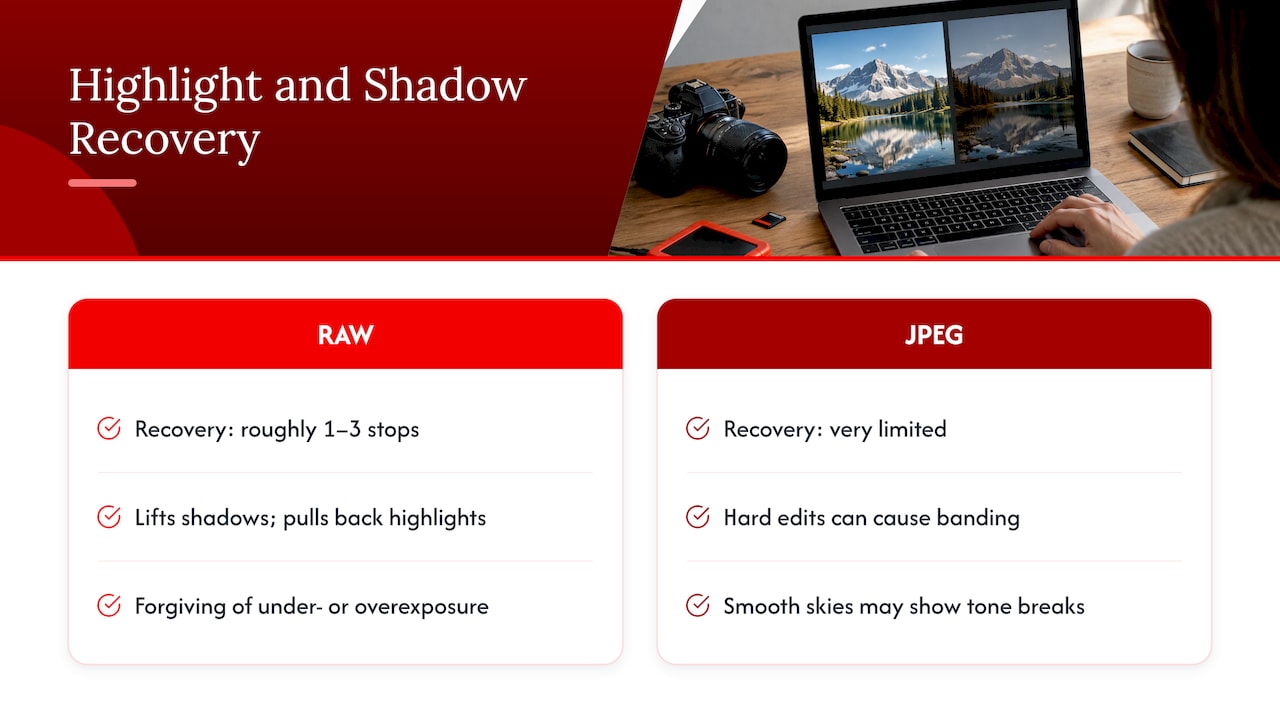
HSM University’s course puts RAW recovery at roughly one to three stops of highlight and shadow, against very limited recovery in a JPEG. Adobe’s photography guide adds that one of RAW’s biggest benefits is lifting shadows and pulling back highlights without the grainy noise you might expect, and that RAW is forgiving when areas are badly under- or overexposed.
With a JPEG, the same moves can cause trouble. Because it holds fewer tones, pulling up shadows or pulling down highlights can produce banding or posterization, the visible stepping you may notice in a sky. A Toronto print specialist describes tone breaks in smooth skies that can resemble a rainbow when 8-bit files are pushed hard.
White balance
In RAW, white balance is a setting you can change later without losing quality. It still affects the preview and histogram on your camera screen, as Photography Life points out, so setting it sensibly in the field is still a good habit. In a JPEG, white balance is already baked in, and corrections are less fine-grained.
Compression and generation loss
JPEG gets its small size by discarding data. HSM University’s lesson on file formats describes typical reductions of 10:1 to 20:1 or more for photographs, and explains that each time you open, edit and save a JPEG it is recompressed and loses more information. Visible artifacts include 8×8 blocking, ringing and color smearing. A JPEG artifacts explainer reports that degradation becomes noticeable after about five to ten resaves at quality 80.
That is why a simple habit helps: edit a copy, keep the original untouched, and export once at the end.
Non-destructive editing
RAW editing works as a set of instructions layered over untouched data. UK Photo Tours describes it this way: the original stays intact, while saving an adjusted JPEG recompresses it and permanently loses some data. You can return to a RAW file years later and process it differently.
File size and storage
This is the honest cost of RAW. For a 24-megapixel camera, HSM University gives about 25 to 50 MB per RAW file and 5 to 15 MB per JPEG. UK Photo Tours reports that RAW files are typically three to eight times larger than JPEG equivalents, and that a full day on a 45-megapixel camera can easily fill a 64 GB card.
A quick worked example: if your camera produces 40 MB RAW files and 10 MB JPEGs, a 64 GB card holds roughly 1,600 RAW photos or about 6,400 JPEGs, before counting video or card overhead. That arithmetic is ours, based on those sample sizes, and your own numbers will differ.
Two things ease the load:
- Lossless compressed RAW. HSM University calls it the best default for critical work, trimming file size by 30 to 50% with no data loss, while lossy RAW compression can show artifacts in extreme edits.
- Faster cards and bigger drives. Speed matters too, since RAW files can slow transfers and backups and may slow the camera during bursts.
If your phone is the camera that fills up first, our guide to freeing up iPhone storage covers quick, medium and recovery fixes.
When RAW is the right choice
Choose RAW when you know you will edit, or when the light is working against you.
- Landscapes and sunsets. Bright skies and dark foregrounds push dynamic range. One guide calls file format the most important landscape setting because RAW gives headroom to balance extreme exposures.
- Portraits and weddings. Skin tones, mixed lighting and client expectations reward flexibility. ToneChef Academy says client work needs RAW less for quality than for flexibility.
- Hard or mixed light. Think backlit scenes, indoor events with window light and stage lighting.
- Large prints. Print shops see the difference. The Toronto specialist above says camera-baked sharpening, contrast and color in a JPEG cannot be effectively undone, which makes JPEG a weaker starting point for printing.
- Night sky and astrophotography. Heavy tonal stretching needs every bit of data.
- Learning. RAW works as a safety net when things happen too fast to nail exposure or white balance.
Planning a team or business shoot
If you are organizing staff portraits, it helps to decide on file format before the photographer arrives, along with lighting, backgrounds and delivery. This staff headshots planning guide walks through how to organize a team photo day, and RAW capture is a natural fit when several people in different clothing and skin tones need consistent, correctable results.
When JPEG is the practical choice
JPEG earns its place when volume and speed win.
- Family snapshots and travel. ToneChef Academy argues that JPEG-only with a good preset is the strongest case for skipping RAW, because volume swamps RAW workflows, quick sharing matters and storage on the road is limited.
- Sports and fast delivery. Photographers who must send images to editors quickly benefit from JPEG, and some cameras offer features such as pre-release capture that only work with JPEG, according to Photography Life.
- Everyday sharing. JPEG is universally compatible with devices, software and browsers.
- Casual shooters. Nikon Canada says JPEG is a safe bet if you do not want to be forced into editing every photo, you are firing many frames in a short time and the light is not tricky.
One caution from Photography Life: getting great JPEGs takes more care at the moment of capture, because so many things cannot be reversed afterward. Check white balance, exposure and picture style before you shoot, and turn on the highlight warning on your camera screen so you can see clipping as it happens.
Phone photos
Most phones save JPEG or a similar processed format by default, and that is fine for everyday use. If your Android shots suddenly look soft and you suspect hardware rather than file format, these steps to fix a blurry Android camera are a sensible first check before you blame compression.
Shooting RAW + JPEG together
Many cameras can save both files for each frame. You get a JPEG to preview or send right away and a RAW file for later editing. Adobe notes that the trade-off is memory, since you store two files for every image. HSM University adds that many photographers use the JPEGs for quick previews and delivery and the RAW files for final editing. Burst speed may also drop, so test your own camera before an important event.
A simple rule: if you are undecided, shoot RAW + JPEG for a month. Delete the JPEGs you never use, and note how often you reached for the RAW file. That tells you which format fits you.
How to convert RAW to JPEG
Yes, you can convert RAW files to JPEG, and it is routine. Adobe explains that editing software does not alter your RAW photo. When you export, it creates a new file, so you can output JPEGs, TIFFs, DNGs and more while the original stays untouched.
Some cameras can do it too. Canon’s manual for the EOS R5 shows how to process RAW images in camera into JPEG or HEIF files, leaving the RAW unchanged so you can create multiple versions with different settings.
A simple RAW editing order
Amateur Photographer outlines a sensible sequence:
- Correct white balance.
- Adjust exposure and set white and black points.
- Apply lens corrections for distortion and color fringing.
- Add creative touches such as contrast and saturation.
- Finish with sharpening and noise reduction, then export as JPEG or TIFF.
If you are building your routine, our step-by-step photography workflow guide shows how to organize import, culling, editing and backup. For outdoor shooters choosing a program, see our roundup of photo editing software for outdoor photography.
How to choose in under a minute
Ask yourself three questions:
- Will I edit this photo? If yes, RAW. If you will post it as is, JPEG is fine.
- Is the light difficult or the moment unrepeatable? If yes, RAW or RAW + JPEG.
- Do I need these files on someone else’s screen within minutes? If yes, JPEG, or RAW + JPEG.
Callum Fischer frames it as room against hours: if you have never opened editing software, RAW buys options you may not use, but if you shoot in bad light and need those options, RAW is not optional. Both choices are valid. What matters is that the format matches the job.
Gear plays a part too. If you are still deciding on a body, our comparison of mirrorless cameras and DSLRs covers what to weigh before you buy.
Our perspective
We think the best photo format is the one that gets you shooting more, and then gets your best frames edited well.
Our team’s advice is to start with RAW + JPEG. You enjoy the instant, shareable picture today, and you keep a full-quality original for the shot you fall in love with next month. As your editing skills grow, the RAW files turn from extra storage into real creative room.
We also like to remind readers that a great photo is rarely about the file alone. Light, timing and a tidy workflow count just as much, and each of those habits is a chance to learn something new about your craft.
Alexander
Reach readers who love photography
We publish guides on cameras, editing and creative hobbies for an engaged general audience. If you run a photography-related business or have expertise to share, you can explore a guest post or banner placement on our advertising page.
FAQ
Should I shoot RAW or JPEG as a beginner?
If you plan to learn editing, shoot RAW or RAW + JPEG, because RAW forgives exposure and white balance mistakes. If you only want quick, shareable pictures, JPEG is a perfectly good choice. Many beginners start with both files and see which they use.
What are the disadvantages of JPEG?
JPEG is 8-bit and lossy, so heavy edits can cause banding or posterization, and each resave loses a little more data. White balance and processing are baked in, so they are hard to change later. Good exposure at capture and a single export from a copy keep those effects small.
Can you convert RAW files to JPEG?
Yes. Editing software can export a RAW file as a JPEG, TIFF or DNG without altering the original, and some cameras can process RAW to JPEG in the body. You can create several JPEG versions from the same RAW file.
Do professional photographers always shoot RAW?
Not always. Weddings, portraits, landscapes and commercial work lean heavily on RAW for flexibility. Sports and news photographers who must deliver images quickly often use JPEG, and many professionals shoot RAW + JPEG to get both speed and editing room.
Sources
- Is Shooting RAW or JPEG better for you? (Nikon Canada)
- Why shoot raw? (Nikon)
- Difference Between JPEG and RAW Files (Clever Photographer)
- Understanding Digital Raw Capture (Bruce Fraser)
- From sensor to file: raw and processed capture (HSM University)
- Still image file formats and compression (HSM University)
- Shoot RAW vs. JPEG: Which format should you choose? (Adobe)
- What are the differences between JPEG and RAW? (Adobe)
- JPEGs are for the Web, not for Printing (Colour Systems)
- JPEG Compression Artifacts (Scanly)
- RAW vs JPEG: Which Should You Shoot? (UK Photo Tours)
- Landscape Photography Camera Settings (PhotoWorkout)
- Fujifilm JPEG vs RAW scenario guide (ToneChef Academy)
- Essential Camera Settings for Beginner Wildlife Photographers (Photography Life)
- Shooting raw: everything you need to know (Amateur Photographer)
- Understanding Photo File Formats in 2025
- Canon EOS R5 manual: RAW processing












Leave a Comment
Your email address will not be published. Required fields are marked with *