
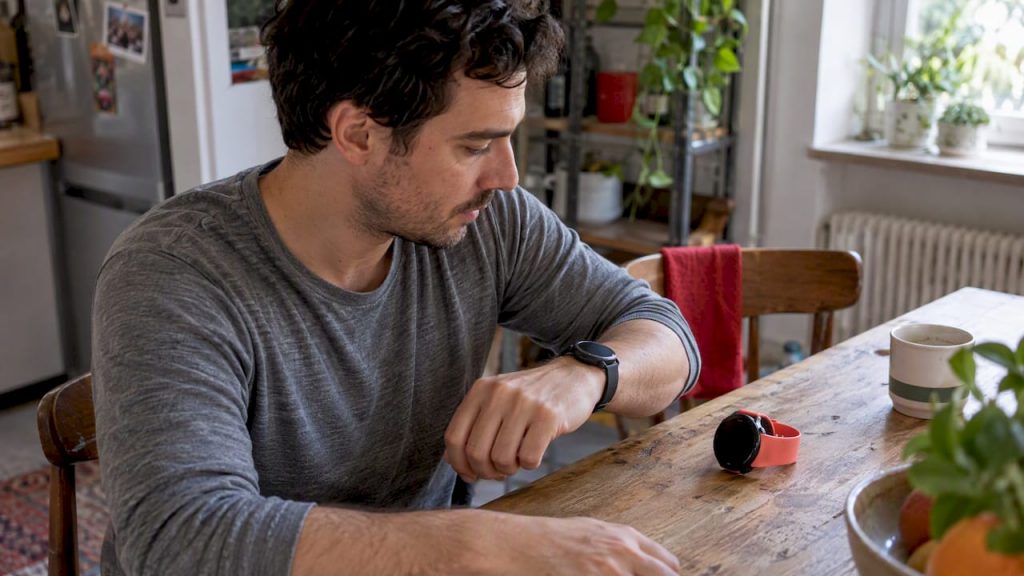
Not sure which smartwatch fits your phone, budget and habits? Our Canadian buying guide covers features, battery life, privacy and the mistakes to avoid.
The right smartwatch is the one that works with your phone, lasts as long as you need between charges, and tracks only the things you actually care about. Everything else, from the screen material to the number of sensors, matters far less than those three points. This guide walks you through the decision in the order that saves the most regret, whether you carry an iPhone or an Android phone, and whether you want a sports companion, a health monitor or simply a smarter way to see your messages.
We wrote it for Canadian shoppers who are tired of ranked lists that change every month. Models come and go, but the questions that decide whether a watch ends up on your wrist or in a drawer stay the same.
TL;DR
- Start with your phone. Compatibility decides which features work, so check it before you look at anything else.
- Decide what you want the watch to do: notifications and payments, workout tracking, or health monitoring. A fitness tracker is often the better buy if you only want the last two.
- Battery life is a daily habit question, not a spec-sheet question. A watch you dread charging is a watch you stop wearing.
- Switch off the alerts you do not need on day one. Notification fatigue is a leading reason people abandon wearables.
- Check privacy controls and return policies before you pay, especially if you are buying for an older relative.
Table of Contents
- Start with the phone in your pocket
- Smartwatch or fitness tracker?
- Smartwatch features explained
- Battery life: the spec that decides whether you keep wearing it
- Size, fit and comfort
- Privacy and data control
- Why so many smartwatches end up in drawers
- Picking by how you live
- Budget: what you pay for and what you can skip
- Our perspective: buy for the habit, not the hype
- A step-by-step way to decide
- Get your product or story in front of readers like you
- FAQ
- Sources
Start with the phone in your pocket
A smartwatch is an extension of your phone, so the first filter is compatibility. Some watches pair fully with only one phone platform, and others pair with both but lose features on one side. Typical casualties are replying to messages from the wrist, certain health apps, and contactless payments.
Here is how to think about it:
- iPhone owners usually get the deepest integration from the watch made by the phone’s own maker. Messaging, calls, health data and app syncing tend to work with the fewest workarounds. Third-party sports watches also pair with iPhones, but expect fewer reply options on notifications.
- Android owners have more choice. Watches that run Google’s wearable software work well with most Android phones, and the phone maker’s own watch often unlocks extra features if you own that brand’s handset. Sports-focused watches that run their own software work with nearly any phone through a companion app.
- Mixed households should avoid buying one watch for everyone. Phone-specific features are the main reason a gift watch gets returned.
Before you buy, open the product page, find the compatibility list and look for your exact phone model and operating system version. Older phones sometimes fall off the supported list after a software update on the watch side.
Smartwatch or fitness tracker?
This is the question that saves the most money. A fitness tracker is usually a slim band with a small screen, focused on steps, heart rate, sleep and workouts. A smartwatch has a larger, brighter display, runs apps, and handles calls, payments and detailed notifications. We break the comparison down further in our guide to smartwatches versus fitness trackers, but the short version is below.
| What matters to you | Fitness tracker | Smartwatch |
|---|---|---|
| Daily steps, sleep and heart rate | Excellent | Excellent |
| Reading and replying to messages | Limited | Strong |
| Apps and contactless payments | Rare | Common |
| Battery life between charges | Often longer | Often shorter |
| Screen size | Small | Larger |
| Typical price range | Lower | Wide, from budget to premium |
| Feels like a watch | Not really | Yes, with many styles |
Pick a tracker if you want to measure your activity quietly and rarely look at the screen. Pick a smartwatch if you want your wrist to replace some of the phone checking you do all day. If you are somewhere in between, a mid-priced smartwatch with a simple watch face and few notifications often fits better than a tracker you will outgrow.
If you are completely new to this category, our smartwatch review for beginners gives seven practical tips, and our explainer on what wearable technology actually is covers the wider family of devices.
Smartwatch features explained
Spec sheets read like alphabet soup. Here is what the common terms mean and when they are worth paying for.
Display
Most current smartwatches use OLED or AMOLED screens, which give deep blacks and bright colours. Entry-level models may use LCD. Some sports watches use a low-power screen that stays readable in sunlight and stretches battery life, at the cost of vivid colour. Look for an always-on option if you want to check the time without lifting your wrist, and test the brightness outdoors if you spend time on the water, on a ski hill or on a trail.
Heart rate and blood oxygen
Optical sensors on the back of the watch estimate your heart rate by shining light into the skin. They are good for trends and effort levels during steady exercise. They are less reliable during sudden, high-intensity intervals, and a loose strap affects the reading. A watch that fits snugly, one finger-width above the wrist bone, gives better data.
GPS
Built-in GPS lets you track a run, ride or hike without carrying your phone. If you only walk and want a rough distance, connected GPS that borrows your phone’s location is enough. If you run in the woods, paddle or cycle on routes with poor signal, built-in GPS is worth the extra cost. Dual-band GPS improves accuracy among tall buildings and tree cover.
Cellular versus Bluetooth
A Bluetooth-only watch relies on your phone being nearby. A cellular model has its own connection, so it can take calls and messages when your phone is at home. That requires a plan add-on from your carrier, and the monthly fee is easy to forget when you compare sticker prices. Ask yourself honestly how often you leave your phone behind. For many people the answer is rarely.
Safety features
Fall detection, emergency SOS and irregular heart rhythm notifications are the features families care about most. Research on older adults and wearables found that health and safety features such as atrial fibrillation and fall detection are highly valued, alongside real concerns about learning curves and data privacy. These tools are meant to prompt a conversation with a clinician, not to diagnose anything. If a watch alerts you to something unusual, talk to your doctor or a pharmacist. Do not rely on a watch alone for a medical decision.
Sleep and recovery scores
Sleep tracking is useful for noticing patterns, such as a late-night screen habit or a restless week. Treat the numbers as a rough guide. Scores that blend several inputs into a single number are interesting, but the trend over weeks tells you more than any single night.
Water resistance and durability
Look for a stated water resistance rating if you swim or shower with your watch. A rating written in metres refers to lab testing under still water, not to real swimming or diving. For rough outdoor use, check for a scratch-resistant glass and a case material that suits your lifestyle. A tough titanium or reinforced polymer case costs more but handles bumps better than a standard aluminum one.
Battery life: the spec that decides whether you keep wearing it
Battery life is easy to compare and hard to interpret. A watch rated for a day and a half feels very different from one rated for two weeks. The first is a nightly charging habit. The second is something you plug in while you watch a show on the weekend.
The evidence supports taking this seriously. In a 2024 survey of more than 11,000 fitness band and watch owners, 13% named the hassle of daily or nightly charging as a main reason they stopped using the device. Academic research on wearables points the same way: when people see a device as a source of nagging or charging stress, they tend to develop an intention to stop using it, whatever the technical specifications.
Use this rough guide when you read battery claims:
- Under two days: typical of full-featured smartwatches with bright screens. Great if you charge at the same time each day, such as while you shower or work at your desk.
- Three to seven days: common in hybrid and sports-focused designs that trade some screen brightness or app power for endurance.
- Two weeks or more: usually fitness bands or watches with simpler displays and fewer smart features.
Manufacturers measure battery life with settings that rarely match your real use. GPS workouts, always-on screens, cellular connections and frequent notifications drain the battery much faster than the headline number. Read independent reviews for real-world results, and plan for about two-thirds of the claim if you use the watch heavily.
If you wear your watch to bed for sleep tracking, check how fast it charges. A watch that goes from empty to a useful level in about half an hour makes the nightly routine painless.
Size, fit and comfort
A watch you do not want to wear is not a bargain at any price. Check these points before you commit:
- Case size. Smaller wrists look better in compact cases, and many makers sell two or three sizes of the same model. Measure your wrist and compare it with the case diameter and thickness.
- Weight. A heavier titanium or steel watch feels solid but can annoy you during sleep.
- Strap type. Silicone is sweat-friendly and durable. Fabric and leather look dressier but need more care. Most watches accept standard quick-release straps, so you can swap later.
- Skin sensitivity. If you notice irritation from jewellery, look for hypoallergenic materials and clean the back of the watch regularly.
If you can, try a watch on in a store before you order online. If you buy online, read the return window carefully and wear the watch for a full day indoors before you decide to keep it.
Privacy and data control
A smartwatch collects intimate information: heart rate, sleep, location, movement. Before you pair it, find out where the data goes and who can see it.
Older-adult research is clear on this point. Specialists studying wearable adoption in people over 55 found that success improves when users get personalized, easy-to-understand outcomes and clear control over what data they share. The same logic applies to every age group.
A short privacy checklist:
- Read what the companion app collects and whether it shares data with third parties or advertisers.
- Turn off location sharing you do not use, and review app permissions on your phone. Our five-minute Android privacy audit for Canadians shows how to do this quickly.
- Check whether you can export or delete your health history.
- Set a screen lock or passcode on the watch, especially if you use contactless payments.
- Find out how long the manufacturer promises to deliver software and security updates.
If you are buying for a parent or grandparent, sit with them during setup and explain each permission in plain language. That single hour tends to matter more than any feature on the box.
Why so many smartwatches end up in drawers

Buying guides rarely mention the most common outcome: people stop wearing the watch. The numbers are striking. According to a 2024 survey of 11,290 respondents, 79% of owners had at least one discarded fitness watch or band at home. The main reasons included not feeling the device was needed because they already exercised regularly (35%), finding it hard to keep up a daily routine (17%), and the charging chore (13%).
So before you shop, ask yourself three honest questions:
- What will this watch do for me that my phone does not? If you cannot name two things, a cheaper device may be enough.
- Will I enjoy the daily routine? If charging every night sounds annoying, choose longer battery life even if the screen is less impressive.
- Do I want to be nudged? Constant reminders and rigid daily goals can turn motivation into stress. The same survey source notes that long-term users often customize alerts heavily and switch off non-essential reminders to avoid notification fatigue.
Practical settings to change in the first hour:
- Disable app notifications except calls, messages from people you choose, calendar alerts and anything safety-related.
- Replace default daily goals with ones you set yourself, or lower them for the first month.
- Turn off stand or breathe reminders if they do not help.
- Schedule do-not-disturb hours for work and sleep.
- Choose one watch face with three or four useful complications and ignore the rest.
These small changes cost nothing and help the watch feel like a tool, not a supervisor. Researchers studying why people keep or drop wearables describe positive social influence and curiosity as drivers of adoption, and an emotional bond with the device as the factor that sustains use. If the watch feels like a friend, you keep it. If it feels like a nag, you do not.
Picking by how you live
The best choice depends less on specs than on your day. Here are common profiles and what to prioritize.
The everyday user
You want notifications, contactless payments, a bright screen and a decent sleep tracker. Choose a mainstream smartwatch that matches your phone, look for a day-and-a-half battery at minimum, and spend the saved effort on a comfortable strap.
The runner, rider or hiker
Prioritize built-in GPS, accurate heart rate during effort, and a battery that survives a long workout plus a few days of use. Sports-focused watches often outlast mainstream models and offer better training metrics, but their apps and payment options can be thinner.

The traveller
Look for offline maps or at least route tracking, solid water resistance, a battery that handles long days away from a charger, and a strap you can rinse. Our guide to wearable tech in travel covers how to use a watch for boarding passes, time zones and safety on the road.
The health-conscious beginner
A simple tracker or an entry-level smartwatch gives you heart rate, steps and sleep without overwhelming you. Add features later if you find you use the basics daily.
The older adult or the person buying for one
Prioritize a large, high-contrast display, simple menus, fall detection, emergency calling and clear privacy controls. A cellular model can be reassuring if the wearer does not always carry a phone. Plan a short setup session, and write down the three or four actions the wearer will use most. Research on adults aged 55 and over suggests that learning curves are a real barrier, so a watch that is slightly less capable but easier to use often wins.
The style-first buyer
If you love traditional watches and want smart features on the side, look at hybrid models that keep an analog dial and add step counting and notifications. Our overview of the different types of watches helps you decide where a smartwatch fits next to a mechanical or quartz piece.
Budget: what you pay for and what you can skip
We do not quote prices here because they shift with sales, new releases and carrier deals, but the structure is stable.
- Entry level: reliable step, heart rate and sleep tracking, basic notifications, plastic cases and simpler screens. Perfect for testing whether you will wear one at all.
- Mid range: better displays, built-in GPS, stronger water resistance and access to apps and payments. This is where most buyers find the best balance.
- Premium: premium materials such as titanium and sapphire glass, advanced sensors, dual-band GPS, longer warranties and the latest chips. Worth it if you use the extras every week, not if you want bragging rights.
Watch for hidden costs: cellular plan fees, replacement straps and chargers, and subscription services for coaching or advanced analytics. Some carriers let you spread the cost over a two-year plan, which may be convenient, but check the total, any plan requirements and what happens if you leave early.
Buying used or refurbished
A second-hand or refurbished watch can save real money, especially on a model from a year or two ago. Check battery health, the return policy, whether the watch has been unlinked from the previous owner’s account, and whether it still receives software updates. Compare several listings before you pay. A guide on how sold-price data helps you price watches explains the idea of looking at what items actually sold for, rather than at optimistic asking prices, which helps you avoid overpaying on the resale market.
Our perspective: buy for the habit, not the hype
At Lizard’s Lunch, we read a lot of product launches, and we notice the same pattern each autumn. New models arrive with bigger numbers and new sensors, and shoppers feel pressure to upgrade. Our team’s view is that most people are better served by choosing a watch that fits one or two daily habits and then protecting that habit.
If you want to see how the category is moving, our look at wearable tech trends worth watching in 2026 and our note on AI tech news that matters for everyday buyers can help you separate genuine progress from marketing. Still, we encourage you to keep three principles in mind.
First, compatibility beats features. A basic watch that works smoothly with your phone will serve you better than a flagship that fights it.
Second, comfort beats specs. The best sensor in the world does nothing if the watch sits in a drawer because the strap itches or the charger is a hassle.
Third, silence is a feature. The most satisfied owners we hear about are the ones who trimmed notifications early and made the watch quiet and useful.
The research we cite points the same way. Discontinuation often has more to do with how a device makes you feel than with what it can measure. A smartwatch should make your day lighter, and we hope this guide helps you find one that does.
— Alexander
A step-by-step way to decide
- Confirm your phone. Write down the model and operating system version and check the watch compatibility list.
- Choose your category. Smartwatch, fitness tracker or hybrid, using the table above.
- Set your must-haves. Pick no more than three: for example built-in GPS, fall detection and a battery that lasts several days.
- Set your budget. Include plan fees, straps and subscriptions.
- Shortlist two or three models. Read independent reviews that test battery life and accuracy, not only the headline specs.
- Check size and fit. Try one on, or confirm an easy return window.
- Review privacy. Read what the app collects and what you can switch off.
- Set up for calm. Turn off unneeded alerts and set goals that suit you.
- Give it a month. If you still enjoy wearing it, you chose well. If not, return it while you still can.
Get your product or story in front of readers like you
If you run a business that serves shoppers who read guides like this one, our team at Lizard’s Lunch offers banner ad placements and guest posts on topics from technology to travel and home. You can find the details on our advertising page.
FAQ
What should I look for when buying a smartwatch?
Start with compatibility with your phone, then battery life, comfort and the two or three features you will use weekly. Add privacy controls and the return policy to the list. Resist paying for sensors and materials you will not use.
Is a smartwatch better than a fitness tracker?
Neither is better in general. A fitness tracker is simpler and often lasts longer on a charge, while a smartwatch offers larger screens, apps and payments. If you mainly want steps, sleep and heart rate, a tracker is often enough.
Why do people stop wearing their smartwatches?
Common reasons include a feeling that the device is not needed, trouble keeping up a routine, and the hassle of charging. In a 2024 survey, 79% of owners reported at least one discarded fitness watch or band at home. Trimming notifications and choosing longer battery life help.
Which smartwatch works best with an iPhone or an Android phone?
The watch from your phone’s own maker usually integrates most deeply. With Android, watches running Google’s wearable software are widely compatible, and sports watches work with both platforms through companion apps. Always check the compatibility list for your exact phone model.
Are smartwatches a good idea for older adults?
They can be, especially with fall detection and emergency calling. Research shows older adults value health and safety features but face learning curves and privacy worries, so choose a simple interface and review data settings together.














Leave a Comment
Your email address will not be published. Required fields are marked with *