Transform your space with our comprehensive entertainment setup guide. Get tips on gear, layout, and sound for an immersive experience!
You bought the gear, cleared the room, and now you’re staring at a tangle of cables and a mounting bracket that doesn’t quite make sense. Sound familiar? Getting a home entertainment system right is one of those projects that looks straightforward until it isn’t. Most advice online either skips the fundamentals or assumes you already know what you’re doing. This entertainment setup guide walks you through every stage, from sizing your room and picking compatible equipment, to running cables, calibrating sound, and solving the problems that show up after everything is “done.” Let’s build something you’ll actually love sitting in.
Table of Contents
- Key takeaways
- Your entertainment setup guide starts with the room
- Choosing display, audio, and accessories
- Step-by-step installation and configuration
- Troubleshooting and optimizing your system
- My take on room-first design
- Take your setup further with smart home upgrades
- FAQ
Key takeaways
| Point | Details |
|---|---|
| Room first, gear second | Evaluate dimensions, seating distance, and speaker placement before buying any equipment. |
| Match screen type to your room | Choose a projector for light-controlled rooms and a large TV for multi-use spaces with ambient light. |
| Balance your speaker layout | A 5.1 or 7.2.4 configuration dramatically improves immersion, but only when placed correctly. |
| Calibrate after installation | Use your receiver’s built-in room correction software to fine-tune levels, timing, and EQ. |
| Plan for maintenance | Periodic recalibration and acoustic upgrades keep your system performing at its best long-term. |
Your entertainment setup guide starts with the room
Here’s the truth most enthusiasts learn the hard way: the room matters more than the gear. You can drop $10,000 on speakers and a receiver, but if your seating is in the wrong spot or your walls are untreated concrete, you’ll get muddy bass and weak dialogue every single time. The most common mistake in home theater installation is prioritizing equipment over room layout. The room should shape the plan, not the other way around.
Dedicated theater vs. media room
These two options aren’t the same thing, and the distinction matters for your planning. A dedicated home theater is a sealed, light-controlled room used exclusively for watching and listening. A media room is a multipurpose living space that happens to have a screen and speakers. Dedicated theaters give you more control over acoustics and light, but they require more investment in acoustic treatment and seating. Media rooms are more flexible but present ongoing challenges with ambient noise and glare.
Getting your dimensions right
A rectangular room around 15 x 20 feet is ideal for a single row of seating. If you want two rows with risers, you’ll want at least 20 feet of depth so the second row doesn’t feel cramped or blocked. Ceiling height matters too. Nine feet or more allows Dolby Atmos overhead effects to separate cleanly from the main channels.
Here’s how to plan your layout before you spend a dollar on equipment:
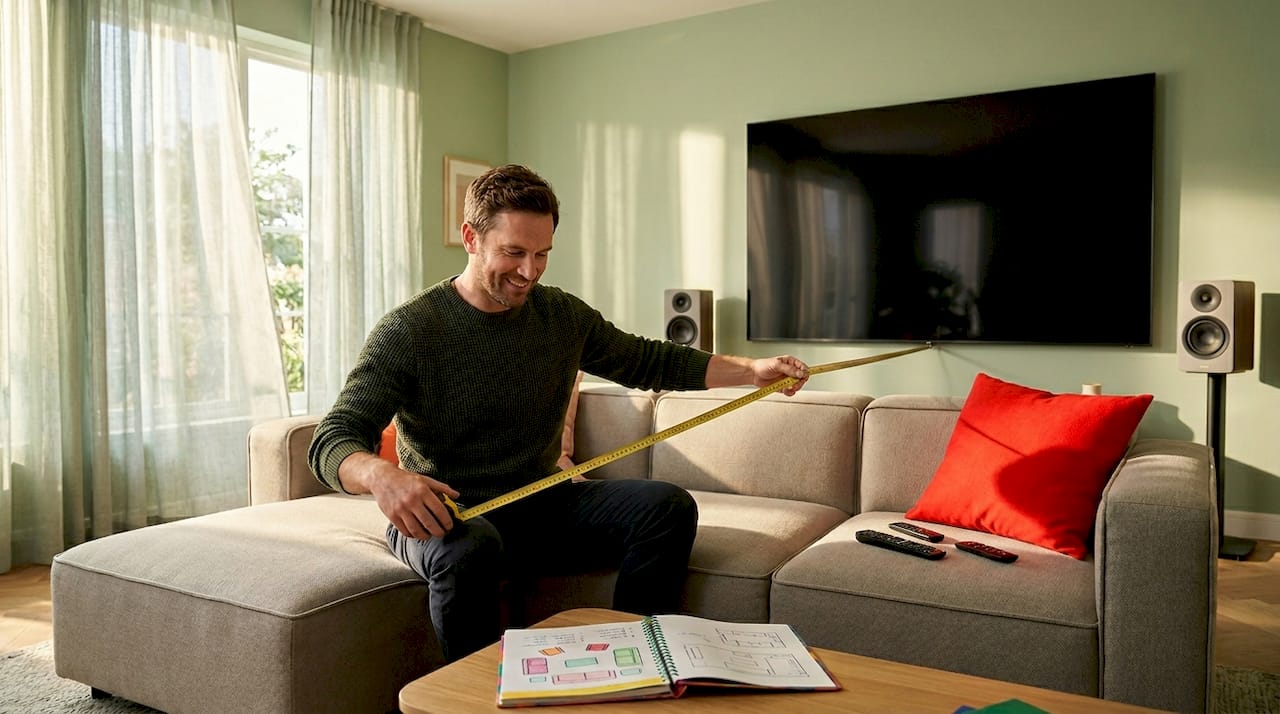
- Measure your room and sketch it on paper or use a free floor planner app
- Mark your screen wall and calculate the seating distance at 1.5 to 2.5 times your planned screen diagonal
- Place tape on the floor to mark seating rows and walk through the sightlines
- Position your center speaker at ear level from your seated position
- Place surround speakers beside or slightly behind the main seating area at roughly ear height
The ideal seating distance is 1.5 to 2.5 times the screen diagonal, so a 100-inch screen puts your primary row between 12 and 20 feet back. Locking in seating and speaker placement early prevents costly redesign later and genuinely improves system performance once everything is running.
Pro Tip: Sit in your taped-out seating area and have someone stand where each speaker will go. You’ll immediately feel if the surround positions feel wrong, and adjusting tape on the floor costs nothing.
Choosing display, audio, and accessories
Once your room layout is locked, choosing equipment becomes much less overwhelming. You’re no longer picking based on specs alone. You’re matching components to the physical constraints and characteristics of your specific space.
Projector vs. large TV
| Feature | Projector | Large TV |
|---|---|---|
| Best for | Light-controlled rooms | Multi-use rooms with ambient light |
| Image size | 100 to 150+ inches possible | Typically up to 98 inches |
| Setup complexity | Higher (screen, throw distance) | Lower (wall mount or stand) |
| Ambient light sensitivity | High (needs blackout shades) | Low to moderate |
| Cost at large sizes | Often lower per inch | Increases sharply above 85 inches |
Projectors shine in dedicated theater rooms with blackout shades and controlled lighting. A large TV works beautifully in a media room where you’ll also use the space during the day. Both can deliver stunning images when matched correctly to the room.
Receivers and speakers
Your AV receiver is the brain of your system. Look for models that support enough amplified channels for your planned layout, plus HDMI 2.1 and eARC, and room correction software like Audyssey MultEQ or Dirac Live. These correction tools automatically measure your room’s acoustic behavior and adjust speaker output accordingly. They’re not optional extras. They’re what makes a good setup great.
For speakers, the most popular layouts are:
- 5.1: Front left, center, front right, two surrounds, one subwoofer. Solid entry point.
- 5.1.4: Adds four ceiling or upward-firing Atmos speakers for overhead sound.
- 7.2.4: Adds two additional surround channels and a second subwoofer for larger rooms.
Matching speaker brands for your front left, center, and right channels creates consistent tonal balance across the soundstage. You can mix brands for surrounds, but keeping the front three matched is the most important rule in speaker selection.
Subwoofers and accessories
Bass is where most setups fail. One subwoofer in the corner creates uneven bass response across different seats. Two subwoofers provide basic balance. Four or more even out bass response across larger rooms or multiple seating rows by distributing sound energy uniformly rather than concentrating it.
Beyond the core components, a few accessories make an enormous difference:
- Acoustic panels at first-reflection points on side walls and the ceiling above the primary seat
- Blackout shades or curtains for any windows in the room
- A smart power conditioner to protect gear from surges and reduce electrical noise
- A universal remote or smart home controller to manage all devices from one interface
Pro Tip: Before buying acoustic panels, clap once loudly in your room and listen. A long, ringing echo means bare, reflective surfaces. A short, flat response means your room already has some natural absorption. This quick test tells you how much treatment you actually need.
Step-by-step installation and configuration
This is where planning pays off. With your layout confirmed and your equipment chosen, the installation process becomes systematic rather than stressful. Professional installation for a dedicated home theater typically takes three to seven days on-site, covering wiring, mounting, calibration, and programming. A DIY home theater guide approach takes longer, but the result can be just as satisfying when done carefully.
Running cables and wiring safely
Follow this sequence for clean, safe wiring:
- Plan every cable run before drilling or cutting. Trace each path from component to component on your room sketch.
- Use oxygen-free copper speaker wire, 14-gauge or 12-gauge for longer runs over 25 feet.
- Use CL2 or CL3 rated cable for any runs inside walls. These ratings meet fire code requirements.
- Route HDMI and speaker cables on separate paths where possible to reduce signal interference.
- Label every cable at both ends before installing. You will thank yourself during calibration.
- Use paintable raceways for exposed cable runs along baseboards or around doorframes.
Good cable management is not just about looks. It protects your investment, simplifies troubleshooting, and keeps the space safe.
Mounting displays and speakers
Mount your display so the center of the screen is at seated eye level, not at standing eye level. Most people mount screens too high, which causes neck strain during long viewing sessions. For speakers, use a level and a stud finder for every mount. Speakers that aren’t firmly anchored vibrate against the wall at high volumes, creating unwanted resonance.
Place your center speaker directly below or above the display, angled toward the primary seating position. Position front left and right speakers at 30 degrees off center from the primary seat. Surround speakers go at roughly 90 to 110 degrees off center, at or just above ear level. For Dolby Atmos, ceiling speakers sit at 30 and 135 degrees from the primary seat or use upward-firing modules placed on top of your main speakers.
Acoustic treatment and calibration
Acoustic treatment targets first reflection points and bass buildup zones. Place dense absorption panels at the side wall reflection points (where a mirror held flat would reflect the speaker back to your seat), and add bass traps in room corners where low frequencies accumulate. Avoid thin foam. Dense fiberglass or rockwool panels perform far better.
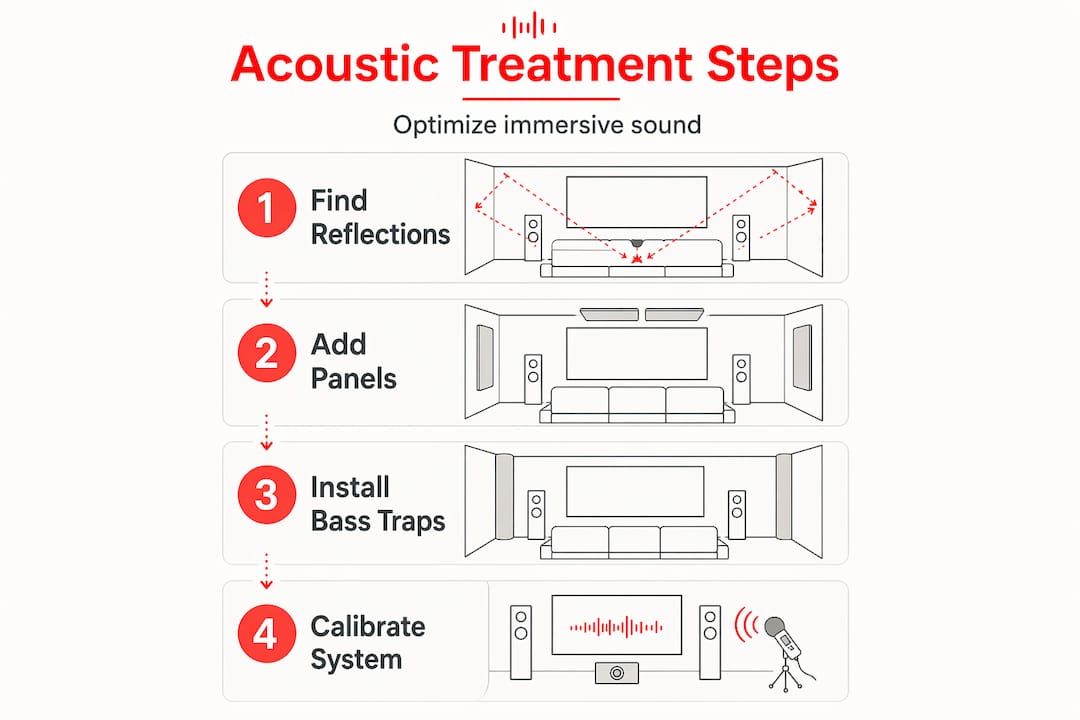
After treatment, run your receiver’s automatic calibration program with the supplied microphone placed at your primary seat. The software measures distance, level, and frequency response for each speaker and applies corrections automatically. Run it again after any furniture changes.
Pro Tip: Run your receiver’s calibration at two or three seat positions and average the results if your system allows it. This smooths the correction across the whole seating area instead of optimizing for one chair.
Here are the most common installation pitfalls to avoid:
- Skipping cable labels and spending hours tracing connections later
- Mounting the screen at standing eye level and straining your neck every movie night
- Placing the subwoofer in a corner without testing other positions first
- Forgetting to test every HDMI input and audio format before closing up the walls
Troubleshooting and optimizing your system
Even a well-planned setup has quirks after installation. The good news is that most common problems have simple solutions once you know what to look for.
Diagnosing sound and image issues
Buzzing or hum from speakers almost always points to a ground loop, a shared electrical path creating interference. Try running the receiver and TV on the same power strip first. If the buzz persists, a ground loop isolator on the audio connection usually solves it. Muffled dialogue is typically a center speaker level issue. Raise it two to three decibels in your receiver’s speaker level menu and retest.
Glare on the screen during daytime viewing calls for blackout shades or repositioning the display away from direct light paths. If glare remains an issue, a high-gain screen (for projectors) or a matte-finish TV panel reduces reflections significantly.
Uneven bass across seats is the most frustrating problem and the most fixable. Move your subwoofer along the front wall in one-foot increments and listen from your primary seat after each move. The “subwoofer crawl” method (placing the sub at your seat and listening from where it would normally sit) helps identify the optimal position quickly.
Pro Tip: Download a free SPL (sound pressure level) meter app on your phone and use pink noise from a test tone generator to check that each speaker is hitting the same volume level from your seat. Your ears lie. The meter doesn’t.
Upgrading and maintaining long-term
Once your setup is running well, periodic upgrades keep it feeling fresh and current. Adding smart home integration, like voice control through a compatible hub or app-based switching, makes the system far more enjoyable for everyday use. DIY installations save on labor costs but require technical skill, and skipping calibration after a component swap often causes more problems than the upgrade solves.
Recalibrate your system any time you:
- Add or replace a speaker or subwoofer
- Rearrange furniture significantly
- Add or remove acoustic treatment panels
- Notice a gradual change in sound quality you can’t attribute to a specific cause
Home theater installation costs average around $25,000 for professional builds, while basic media rooms start around $2,000. Knowing where your setup falls on that spectrum helps you decide when professional recalibration is worth the expense versus a quick DIY tune-up.
My take on room-first design
I’ve worked through enough entertainment setups to have a strong opinion on where most people go wrong, and it’s almost never the equipment. It’s the sequence. People buy a gorgeous 85-inch TV, then figure out where to put it, and then wonder why the sound feels thin and the picture washes out by noon. The room is not an afterthought. It’s the instrument.
What I’ve seen consistently, whether in a $3,000 media room or a $60,000 dedicated theater, is that the spaces that sound and feel the best are the ones where someone spent real time on layout before spending money on gear. A modest receiver and a matched 5.1 speaker system in a properly treated room will genuinely outperform a flagship system thrown into an untreated rectangular box.
My advice is to spend at least a week living with your taped-out floor plan before buying anything. Sit in it. Watch a movie on your laptop from that position. Notice what annoys you about the light or the sightlines. That week of observation will save you months of frustration.
I also want to be honest about aesthetics versus performance. You might have to negotiate between the room your partner wants to live in and the room your ears want to exist in. That’s real. The good news is that thoughtful home upgrades can satisfy both goals. Fabric-wrapped acoustic panels look intentional and stylish. Good cable management is invisible. The best setups are the ones where the technology disappears and the experience takes over.
— Alexander
Take your setup further with smart home upgrades
Your entertainment setup doesn’t exist in isolation. The lighting, seating, ventilation, and even the paint color in your room all affect the experience. If you’re already investing in a quality system, it’s worth thinking about the broader room environment at the same time. Dimmer switches, smart lighting scenes, and blackout window treatments work together to create an atmosphere that feels intentional and immersive every time you sit down.
For readers who want to go further, exploring home improvement ideas that are tailored to entertainment and media spaces can reveal upgrades you hadn’t considered. From soundproofing strategies to furniture choices that double as acoustic diffusers, there’s a lot of room to grow. If you’re ready to see how a full room transformation can boost both comfort and home value, the tips that maximize ROI section covers exactly that. And for readers excited about integrating smart tech into their setup, exploring home tech ideas opens up a world of possibilities from voice control to automated lighting scenes.
FAQ
What is the ideal seating distance for a home theater?
The ideal seating distance is 1.5 to 2.5 times your screen diagonal. For a 100-inch screen, that places your primary row between 12 and 20 feet from the display.
How many subwoofers do I actually need?
Two subwoofers provide basic bass balance for most rooms. Larger spaces or setups with multiple seating rows benefit from four or more, positioned to distribute bass energy evenly across all seats.
Should I choose a projector or a large TV for my setup?
Choose a projector if you have a light-controlled room and want a screen larger than 100 inches. Choose a large TV for multi-use spaces where ambient light is present during viewing.
Do I need acoustic treatment if I have carpet and a couch?
Carpet and upholstered furniture help, but they primarily absorb high frequencies. You still need corner bass traps and side-wall panels to address low-frequency buildup and mid-range reflections that cause muddy sound.
When should I hire a professional instead of doing it myself?
Consider hiring a professional when your installation involves in-wall wiring, custom mounting, or a dedicated theater room. DIY setups carry risks around safe wiring, calibration accuracy, and potential warranty issues that professional installers are trained to avoid.















Leave a Comment
Your email address will not be published. Required fields are marked with *